Google Webmaster Central Blog - Official news on crawling and indexing sites for the Google index

Improved handling of URLs with parameters

Friday, July 22, 2011 at 8:15 AM

Webmaster level: Advanced

You may have noticed that the Parameter Handling feature disappeared from the Site configuration > Settings section of Webmaster Tools. Fear not; you can now find it under its new name, URL Parameters! Along with renaming it, we refreshed and improved the feature. We hope you’ll find it even more useful. Configuration of URL parameters made in the old version of the feature will be automatically visible in the new version. Before we reveal all the cool things you can do with URL parameters now, let us remind you (or introduce, if you are new to this feature) of the purpose of this feature and when it may come in handy.

When to use
URL Parameters helps you control which URLs on your site should be crawled by Googlebot, depending on the parameters that appear in these URLs. This functionality provides a simple way to prevent crawling duplicate content on your site. Now, your site can be crawled more effectively, reducing your bandwidth usage and likely allowing more unique content from your site to be indexed. If you suspect that Googlebot's crawl coverage of the content on your site could be improved, using this feature can be a good idea. But with great power comes great responsibility! You should only use this feature if you're sure about the behavior of URL parameters on your site. Otherwise you might mistakenly prevent some URLs from being crawled, making their content no longer accessible to Googlebot.
A lot more to do
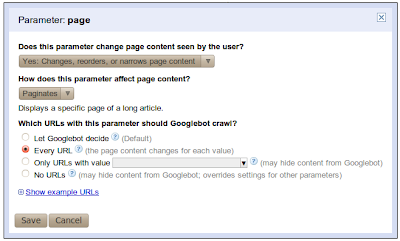
Okay, let’s talk about what’s new and improved. To begin with, in addition to assigning a crawl action to an individual parameter, you can now also describe the behavior of the parameter. You start by telling us whether or not the parameter changes the content of the page. If the parameter doesn’t affect the page’s content then your work is done; Googlebot will choose URLs with a representative value of this parameter and will crawl the URLs with this value. Since the parameter doesn’t change the content, any value chosen is equally good. However, if the parameter does change the content of a page, you can now assign one of four possible ways for Google to crawl URLs with this parameter:
  • Let Googlebot decide
  • Every URL
  • Only crawl URLs with value=x
  • No URLs
We also added the ability to provide your own specific value to be used, with the “Only URLs with value=x” option; you’re no longer restricted to the list of values that we provide. Optionally, you can also tell us exactly what the parameter does--whether it sorts, paginates, determines content, etc. One last improvement is that for every parameter, we’ll try to show you a sample of example URLs from your site that Googlebot crawled which contain that particular parameter.

Of the four crawl options listed above, “No URLs” is new and deserves special attention. This option is the most restrictive and, for any given URL, takes precedence over settings of other parameters in that URL. This means that if the URL contains a parameter that is set to the “No URLs” option, this URL will never be crawled, even if other parameters in the URL are set to “Every URL.” You should be careful when using this option. The second most restrictive setting is “Only URLs with value=x.”

Feature in use
Now let’s do something fun and exercise our brains on an example.
- - -
Once upon a time there was an online store, fairyclothes.example.com. The store’s website used parameters in its URLs, and the same content could be reached through multiple URLs. One day the store owner noticed, that too many redundant URLs could be preventing Googlebot from crawling the site thoroughly. So he sent his assistant CuriousQuestionAsker to The GreatWebWizard to get advice on using the URL parameters feature to reduce the duplicate content crawled by Googlebot. The Great WebWizard was famous for his wisdom. He looked at the URL parameters and proposed the following configuration:

Parameter nameEffect on content?What should Googlebot crawl?
trackingIdNoneOne representative URL
sortOrderSortsOnly URLs with value = ‘lowToHigh’
sortBySortsOnly URLs with value = ‘price’
filterByColorNarrowsNo URLs
itemIdSpecifiesEvery URL
pagePaginatesEvery URL

The CuriousQuestionAsker couldn’t avoid his nature and started asking questions:

CuriousQuestionAsker: You’ve instructed Googlebot to choose a representative URL for trackingId (value to be chosen by Googlebot). Why not select the Only URLs with value=x option and choose the value myself?
Great WebWizard: While crawling the web Googlebot encountered the following URLs that link to your site:
  1. fairyclothes.example.com/skirts/?trackingId=aaa123
  2. fairyclothes.example.com/skirts/?trackingId=aaa124
  3. fairyclothes.example.com/trousers/?trackingId=aaa125
Imagine that you were to tell Googebot to only crawl URLs where “trackingId=aaa125”. In that case Googlebot would not crawl URLs 1 and 2 as neither of them has the value aaa125 for trackingId. Their content would neither be crawled nor indexed and none of your inventory of fine skirts would show up in Google’s search results. No, for this case choosing a representative URL is the way to go. Why? Because that tells Googlebot that when it encounters two URLs on the web that differ only in this parameter (as URLs 1 and 2 above do) then it only needs to crawl one of them (either will do) and it will still get all the content. In the example above two URLs will be crawled; either 1 & 3, or 2 & 3. Not a single skirt or trouser will be lost.

CuriousQuestionAsker: What about the sortOrder parameter? I don’t care if the items are listed in ascending or descending order. Why not let Google select a representative value?
Great WebWizard: As Googlebot continues to crawl it may find the following URLs:
  1. fairyclothes.example.com/skirts/?page=1&sortBy=price&sortOrder=’lowToHigh’
  2. fairyclothes.example.com/skirts/?page=1&sortBy=price&sortOrder=’highToLow’
  3. fairyclothes.example.com/skirts/?page=2&sortBy=price&sortOrder=’lowToHigh’
  4. fairyclothes.example.com/skirts/?page=2&sortBy=price&sortOrder=’ highToLow’
Notice how the first pair of URLs (1 & 2) differs only in the value of the sortOrder parameter as do URLs in the second pair (3 & 4). However, URLs 1 and 2 will produce different content: the first showing the least expensive of your skirts while the second showing the priciest. That should be your first hint that using a single representative value is not a good choice for this situation. Moreover, if you let Googlebot choose a single representative from among a set of URLs that differ only in their sortOrder parameter it might choose a different value each time. In the example above, from the first pair of URLs, URL 1 might be chosen (sortOrder=’lowToHigh’). Whereas from the second pair URL 4 might be picked (sortOrder=’ highToLow’). If that were to happen Googlebot would crawl only the least expensive skirts (twice):
  • fairyclothes.example.com/skirts/?page=1&sortBy=price&sortOrder=’lowToHigh’
  • fairyclothes.example.com/skirts/?page=2&sortBy=price&sortOrder=’ highToLow’
Your most expensive skirts would not be crawled at all! When dealing with sorting parameters consistency is key. Always sort the same way.

CuriousQuestionAsker: How about the sortBy value?
Great WebWizard: This is very similar to the sortOrder attribute. You want the crawled URLs of your listing to be sorted consistently throughout all the pages, otherwise some of the items may not be visible to Googlebot. However, you should be careful which value you choose. If you sell books as well as shoes in your store, it would be better not to select the value ‘title’ since URLs pointing to shoes never contain ‘sortBy=title’, so they will not be crawled. Likewise setting ‘sortBy=size’ works well for crawling shoes, but not for crawling books. Keep in mind that parameters configuration has influence throughout the whole site.

CuriousQuestionAsker: Why not crawl URLs with parameter filterByColor?
Great WebWizard: Imagine that you have a three-page list of skirts. Some of the skirts are blue, some of them are red and others are green.
  • fairyclothes.example.com/skirts/?page=1
  • fairyclothes.example.com/skirts/?page=2
  • fairyclothes.example.com/skirts/?page=3
This list is filterable. When a user selects a color, she gets two pages of blue skirts:
  • fairyclothes.example.com/skirts/?page=1&flterByColor=blue
  • fairyclothes.example.com/skirts/?page=2&flterByColor=blue
They seem like new pages (the set of items are different from all other pages), but there is actually no new content on them, since all the blue skirts were already included in the original three pages. There’s no need to crawl URLs that narrow the content by color, since the content served on those URLs was already crawled. There is one important thing to notice here: before you disallow some URLs from being crawled by selecting the “No URLs” option, make sure that Googlebot can access the content in another way. Considering our example, Googlebot needs to be able to find the first three links on your site, and there should be no settings that prevent crawling them.
- - -

If your site has URL parameters that are potentially creating duplicate content issues then you should check out the new URL Parameters feature in Webmaster Tools. Let us know what you think or if you have any questions post them to the Webmaster Help Forum.

The comments you read here belong only to the person who posted them. We do, however, reserve the right to remove off-topic comments.

46 comments:

DN said...

Good stuff! Thanks.

Salman Siddiqui said...

now that is really loads of info..tweeted and plused

Salman Siddiqui said...
This comment has been removed by the author.
jschwartz said...

Is the "Great WebWizzard" Matt Cuts?

Peter said...

When a URL is no longer crawled, because it's filtered by one of the URL parameters, is it also removed from the index?

Jeremy said...

Is this example assuming that the SortBy parameter is required for functionality of the example site?

If you had the option of catalog/ and catalog/?SortBy=Price why wouldn't you pick to crawl "No URLs"

ningning said...
This comment has been removed by the author.
Unknown said...
This comment has been removed by the author.
Unknown said...

To Peter: short answer is yes. Although the goal is that with the right configuration, the useful content contained in that url can be found in other crawled&indexed urls.

To Jeremy: if SortBy is not required for the functionality of the site, AND the search engine can discover all urls with similar content but without SortBy (such as your example catalog/), indeed "No URLS" could be a better option. If webmasters are not sure about any of the two assumptions above, "Only URLS with value=" is a more safe setting.

ningning said...

To Peter: short answer is yes. Although the goal is that with right configuration, the useful content contained in that url can be found in other crawled&indexed urls.

Unknown said...

@ningning To Jeremy: indeed "No URLs" could be the right setting if the contents from all urls with "SortBy" can be found with urls without "SortBy", AND that the urls without "SortBy" are properly linked and can be discovered by Googlebot. If webmaster is not sure about either of the assumptions, "Only URLs with value =" is a safer bet.
~

Peter said...

@ningning Thank you. I'm actually already returning noindex on those pages. I'm hoping this could / would remove them faster as they should not have been indexed in the first place -- by mistake the canonical link was left out, so now we have tons and tons of indexed links that should have been.

Peter said...

Correction: should "not" have been...

Unknown said...

@ningning To Peter. No. "No URLs" can not be used to remove a url fast from the index. It is not fast and no absolute guarantee.

Dejan SEO said...

Very good timing guys.

Arjen said...

't Be usefull to also see an option to actually remove a parameter or ignore its existence completely. See for instance Peter's example. The sort-parameter is completely optional and could be left out.
But maybe you're not entirely sure Google also found that other link or you'd like Google to treat any variant of a certain parameter as if it didn't have that paramater at all. The latter is different from ignoring the url completely and it will still reduce the total number of url's crawled.

corona said...

My site working from 2003. Now my site has 500 000 pages. This is not a store. I do not sell nothing from my site. After that news I must delete my site from internet because I can follow to this instructions! Google, please stop to trying to be monopolizing the Internet.

corona said...

My site working since 2003 and has more 500 000 pages. This is not a store. My site has free unique programs which visitors of my site like too much. Following this instruction I must close my site because I can not do what Google's team tell here. Also I can follow most of new guidelines of Google. Google even required that kind of CMS I have to use on my site. My site use bitrix but Google's robots can not indexing right the site with bitrix.
Google, please, STOP monopolizing the Internet. Internet is not your private property!

Britclaims said...

good stuff and nice information

Vineet Gupta said...

Now, the Google Webmasters has provided the real tool for dynamic websites, it seems that now Google has started things about dynamic websites. By defining Parameters, Search Engine would accept the pages more quickly and provide the good results to the internet users. I had changed my website parameters twice in last 3 years but now with new tool, I can stop Search Engine to stop displaying my Old Parameters pages to the users. Both the Owner of website and user would be benefited with this feature. I would also like to suggest webmasters to define the parameters to understand the dynamic websites. For instance, if dynamic website are searching for something then describe the parameter as "search" or "searchterm" and for sorting the results as "sort" to track the product use the parameter as "productid" or "fileid" and for categories use of parameter "cat" or "catz" and by defining the such parameters this would help the search engine to understand the dynamic websites more easily. Last recommendation to add the parameter for site category in url pattern such as example.com/search.php?news=&search=&google
example.com/search.php?legal=&search=guilty

I would like link to give 6/10 for new feature but still more to be done for dynamic websites.

The Clicker said...

What if I don't do anything, does it affect anything on my site?

Unknown said...

@ningning To Clicker: No it does not.

ขายอาหารเสริมราคาส่ง,ขายซันคลาร่าของแท้ราคาส่ง said...

Thanks

Unknown said...

@ningning to Corona: I am not sure that I understand your comment. If the concern is that parameter configurations seems very difficult or inconvenient, then there is no need to worry. For most of the sites, Googlebot does pretty good job by default.

Pablo said...

@corona. What you say doesn't make sense. It doesn't matter what google does, your website won't be affected. A different thing, is that google provides you the free service to let others know about your website. You should be thankful.

Gerryino said...

My cms uses the same page to show the news feed, the ICAL feed and the printable version:
/page.html?show=RSS
/page.html?show=ICAL
/page.html?show=printable

What's the best solution? Exclude everything, exclude just the printable one (is the same page without graphics), don't exclude anything?

Rudy McCormick said...

Right as rain!!

Rudy McCormick said...
This comment has been removed by the author.
CB said...

If I create a parameter for my manufacturer pages, but the only way those are designated is through a /m- (sitename.com/m-manufacturerx), would I just use /m- for the parameter rules?

Unknown said...

@ningning to CB: m-manufacturerx in your example is not a URL parameter. Your site is using URL path to encode parameters. This is difficult for Google to interpret and this parameter configuration tool can not help for such case.

Unknown said...

@ningning to Gerryino. I don't understand the question very well. Do you mean that for EACH page content in your site, there are always three variants of the page with 3 urls?

Can you provide 3 full urls as example?

mach7 said...

Can anyone explain where those parameters came from?

I have a page that has been indexed by Google for a number of years without any problems.
Severeal days ago it is flagged for duplicate content, meta description, title, etc.

Original, uploaded page: www.example.com/abc.html
Mystery page with added parameters: www.example.com/abc.html?iframe=true&width=100%&height=100%

Who added those parameters, where is that page located, and how do I delete it?

Care Taker said...

Another Handy tool, now there will ne no complexity in maintaining URL.

Sajeet Nair said...

Does this feature mean that the SEO value of the dynamic URL will pass on to the static version i.e. in simple words does this feature act as a canonical tag????

Andre said...

A good thing that the URL parameters got more options. In the company we manage several unit websites at example.com/unitname individually via webmaster tools. If the main company website at example.com is setting the URL parameters will they override our unit settings?
Example: In the unit we set 'name' to every URL but at company level 'name' is set no URLs. Will the company level setting for the root domain cascade down to all units and override individual settings?

seoer said...

Seriously I don't understand which is the real added value of having indexed the pages ordered by prices from higher to lower.

But thanks for the new feature. That was a real limitation.

Unknown said...

@ningning to Andre: You raised a good questions. The configuration on the main site(example.com/) DOES NOT override configurations on the child site(example.com/unitname). But if the main site configured some parameter that the child site does not configure, it will take effect on both main and child site.

igal said...

Hello.
1st of all Great Post and really Great new Feature.
Still I have one question. Lets say my site has, for some items/periods of time, a limited inventory and (following your example) the page that shows the cheapest items and the page that shows the pricest items are basically the same - same page with the same content, only arranged differently.
How can i prevent a duplicated content scenario?
What happens if not, but some content (60-70%) is the same?
I think many sites will have this problem because there are many different site searches that will provide a very similar pages but different URLs.
For Example: Searching for most popular blue shirt and searching for the pricest blue shirt... etc.

Aditya 'Mario' said...

thanks. :)

Unknown said...

@ningning to Igal: If I understand you correctly, you are comparing two urls:
1.example.com/search?category=shirts&color=blue&orderby=price&ordering=HighToLow
2.example.com/search?category=shirts&color=blue&orderby=popularity&ordering=HighToLow

These two urls should produce 100% same content (across all pages if there is more than one page).

You can configure "orderby" parameter to use only one value (e.g. popularity) and configure "ordering" parameter to "HighToLow".

Kadur said...

thanks for info

Ramlan Tjong said...

confused

Khalid said...

Thank you for the nice insight, but I can't get hold of the utility in the webmasters tools.

FMAG Dev said...

Very good post however there is still one part of the feature that doesn't quite work and that is setting the parameter as not affecting the content on the page.

On my site we have internal linking with no tracking information on them, however from external sites we have added a parameter so we can see who the referencing site/company is, this means we end up with two versions of url indexed www.example.com/pageA.asp and www.example.com/pageA.asp?tc=PO

The setting only allows you to have one representative URL indexed and not that no URL's with this should be indexed. You can make this choice if you say it affects the page content, but not if it doesn't. Is there any way to achieve this without specifying the wrong affect of the parameter?

Yael said...

Hi, a silly question. If I choose to crawl URLs with only "x" value in "y" parameter.. what about URLs that do not make use of that parameter? Are they still going to be crawled?

Unknown said...

To @Yael, the answer is yes, urls without the parameter are not affected by the setting for a parameter.
