Webmaster level: Advanced
You may have noticed that the Parameter Handling feature disappeared from the
Site configuration > Settings section of Webmaster Tools. Fear not; you can now find it under its new name, URL Parameters! Along with renaming it, we refreshed and improved the feature. We hope you’ll find it even more useful. Configuration of URL parameters made in the old version of the feature will be automatically visible in the new version. Before we reveal all the cool things you can do with URL parameters now, let us remind you (or introduce, if you are new to this feature) of the purpose of this feature and when it may come in handy.
When to use
URL Parameters helps you control which URLs on your site should be crawled by Googlebot, depending on the parameters that appear in these URLs. This functionality provides a simple way to prevent crawling duplicate content on your site. Now, your site can be crawled more effectively, reducing your bandwidth usage and likely allowing more unique content from your site to be indexed. If you suspect that Googlebot's crawl coverage of the content on your site could be improved, using this feature can be a good idea. But with great power comes great responsibility! You should only use this feature if you're sure about the behavior of URL parameters on your site. Otherwise you might mistakenly prevent some URLs from being crawled, making their content no longer accessible to Googlebot.
 A lot more to do
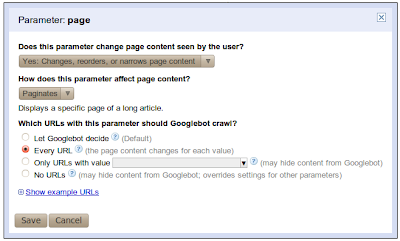
Okay, let’s talk about what’s new and improved. To begin with, in addition to assigning a crawl action to an individual parameter, you can now also describe the behavior of the parameter. You start by telling us whether or not the parameter changes the content of the page. If the parameter doesn’t affect the page’s content then your work is done; Googlebot will choose URLs with a representative value of this parameter and will crawl the URLs with this value. Since the parameter doesn’t change the content, any value chosen is equally good. However, if the parameter does change the content of a page, you can now assign one of four possible ways for Google to crawl URLs with this parameter:
- Let Googlebot decide
- Every URL
- Only crawl URLs with value=x
- No URLs
We also added the ability to provide your own specific value to be used, with the “Only URLs with value=x” option; you’re no longer restricted to the list of values that we provide. Optionally, you can also tell us exactly what the parameter does--whether it sorts, paginates, determines content, etc. One last improvement is that for every parameter, we’ll try to show you a sample of example URLs from your site that Googlebot crawled which contain that particular parameter.
Of the four crawl options listed above, “No URLs” is new and deserves special attention. This option is the most restrictive and, for any given URL, takes precedence over settings of other parameters in that URL. This means that if the URL contains a parameter that is set to the “No URLs” option, this URL will never be crawled, even if other parameters in the URL are set to “Every URL.” You should be careful when using this option. The second most restrictive setting is “Only URLs with value=x.”
Feature in use
Now let’s do something fun and exercise our brains on an example.
- - -
Once upon a time there was an online store,
fairyclothes.example.com. The store’s website used parameters in its URLs, and the same content could be reached through multiple URLs. One day the store owner noticed, that too many redundant URLs could be preventing Googlebot from crawling the site thoroughly. So he sent his assistant CuriousQuestionAsker to The GreatWebWizard to get advice on using the URL parameters feature to reduce the duplicate content crawled by Googlebot. The Great WebWizard was famous for his wisdom. He looked at the URL parameters and proposed the following configuration:
| Parameter name | Effect on content? | What should Googlebot crawl? |
|---|
| trackingId | None | One representative URL |
| sortOrder | Sorts | Only URLs with value = ‘lowToHigh’ |
| sortBy | Sorts | Only URLs with value = ‘price’ |
| filterByColor | Narrows | No URLs |
| itemId | Specifies | Every URL |
| page | Paginates | Every URL |
The CuriousQuestionAsker couldn’t avoid his nature and started asking questions:
CuriousQuestionAsker: You’ve instructed Googlebot to choose a representative URL for trackingId (value to be chosen by Googlebot). Why not select the
Only URLs with value=x option and choose the value myself?
Great WebWizard: While crawling the web Googlebot encountered the following URLs that link to your site:
- fairyclothes.example.com/skirts/?trackingId=aaa123
- fairyclothes.example.com/skirts/?trackingId=aaa124
- fairyclothes.example.com/trousers/?trackingId=aaa125
Imagine that you were to tell Googebot to only crawl URLs where “trackingId=aaa125”. In that case Googlebot would not crawl URLs 1 and 2 as neither of them has the value aaa125 for trackingId. Their content would neither be crawled nor indexed and none of your inventory of fine skirts would show up in Google’s search results. No, for this case choosing a representative URL is the way to go. Why? Because that tells Googlebot that when it encounters two URLs on the web that differ only in this parameter (as URLs 1 and 2 above do) then it only needs to crawl one of them (either will do) and it will still get all the content. In the example above two URLs will be crawled; either 1 & 3, or 2 & 3. Not a single skirt or trouser will be lost.
CuriousQuestionAsker: What about the sortOrder parameter? I don’t care if the items are listed in ascending or descending order. Why not let Google select a representative value?
Great WebWizard: As Googlebot continues to crawl it may find the following URLs:
- fairyclothes.example.com/skirts/?page=1&sortBy=price&sortOrder=’lowToHigh’
- fairyclothes.example.com/skirts/?page=1&sortBy=price&sortOrder=’highToLow’
- fairyclothes.example.com/skirts/?page=2&sortBy=price&sortOrder=’lowToHigh’
- fairyclothes.example.com/skirts/?page=2&sortBy=price&sortOrder=’ highToLow’
Notice how the first pair of URLs (1 & 2) differs only in the value of the sortOrder parameter as do URLs in the second pair (3 & 4). However, URLs 1 and 2 will produce different content: the first showing the least expensive of your skirts while the second showing the priciest. That should be your first hint that using a single representative value is not a good choice for this situation. Moreover, if you let Googlebot choose a single representative from among a set of URLs that differ only in their sortOrder parameter it might choose a different value each time. In the example above, from the first pair of URLs, URL 1 might be chosen (sortOrder=’lowToHigh’). Whereas from the second pair URL 4 might be picked (sortOrder=’ highToLow’). If that were to happen Googlebot would crawl only the least expensive skirts (twice):
- fairyclothes.example.com/skirts/?page=1&sortBy=price&sortOrder=’lowToHigh’
- fairyclothes.example.com/skirts/?page=2&sortBy=price&sortOrder=’ highToLow’
Your most expensive skirts would not be crawled at all! When dealing with sorting parameters consistency is key. Always sort the same way.
CuriousQuestionAsker: How about the sortBy value?
Great WebWizard: This is very similar to the sortOrder attribute. You want the crawled URLs of your listing to be sorted consistently throughout all the pages, otherwise some of the items may not be visible to Googlebot. However, you should be careful which value you choose. If you sell books as well as shoes in your store, it would be better not to select the value ‘title’ since URLs pointing to shoes never contain ‘sortBy=title’, so they will not be crawled. Likewise setting ‘sortBy=size’ works well for crawling shoes, but not for crawling books. Keep in mind that parameters configuration has influence throughout the whole site.
CuriousQuestionAsker: Why not crawl URLs with parameter filterByColor?
Great WebWizard: Imagine that you have a three-page list of skirts. Some of the skirts are blue, some of them are red and others are green.
- fairyclothes.example.com/skirts/?page=1
- fairyclothes.example.com/skirts/?page=2
- fairyclothes.example.com/skirts/?page=3
This list is filterable. When a user selects a color, she gets two pages of blue skirts:
- fairyclothes.example.com/skirts/?page=1&flterByColor=blue
- fairyclothes.example.com/skirts/?page=2&flterByColor=blue
They seem like new pages (the set of items are different from all other pages), but there is actually no new content on them, since all the blue skirts were already included in the original three pages. There’s no need to crawl URLs that narrow the content by color, since the content served on those URLs was already crawled. There is one important thing to notice here: before you disallow some URLs from being crawled by selecting the “No URLs” option, make sure that Googlebot can access the content in another way. Considering our example, Googlebot needs to be able to find the first three links on your site, and there should be no settings that prevent crawling them.
- - -
If your site has
URL parameters that are potentially creating duplicate content issues then you should check out the new URL Parameters feature in Webmaster Tools. Let us know what you think or if you have any questions post them to the
Webmaster Help Forum.
Written by Kamila Primke, Software Engineer, Webmaster Tools Team


