Google Webmaster Central Blog - Official news on crawling and indexing sites for the Google index

Running desktop and mobile versions of your site

Wednesday, November 18, 2009 at 10:15 PM

(This post was largely translated from our Japanese version of the Webmaster Central Blog )

Recently I introduced several methods to ensure your mobile site is properly indexed by Google. Today I'd like to share information useful for webmasters who manage both desktop and mobile phone versions of a site.

One of the most common problems for webmasters who run both mobile and desktop versions of a site is that the mobile version of the site appears for users on a desktop computer, or that the desktop version of the site appears when someone finds them from a mobile device. In dealing with this scenario, here are two viable options:

Redirect mobile users to the correct version
When a mobile user or crawler (like Googlebot-Mobile) accesses the desktop version of a URL, you can redirect them to the corresponding mobile version of the same page. Google notices the relationship between the two versions of the URL and displays the standard version for searches from desktops and the mobile version for mobile searches.

If you redirect users, please make sure that the content on the corresponding mobile/desktop URL matches as closely as possible. For example, if you run a shopping site and there's an access from a mobile phone to a desktop-version URL, make sure that the user is redirected to the mobile version of the page for the same product, and not to the homepage of the mobile version of the site. We occasionally find sites using this kind of redirect in an attempt to boost their search rankings, but this practice only results in a negative user experience, and so should be avoided at all costs.

On the other hand, when there's an access to a mobile-version URL from a desktop browser or by our web crawler, Googlebot, it's not necessary to redirect them to the desktop-version. For instance, Google doesn't automatically redirect desktop users from their mobile site to their desktop site, instead they include a link on the mobile-version page to the desktop version. These links are especially helpful when a mobile site doesn't provide the full functionality of the desktop version -- users can easily navigate to the desktop-version if they prefer.

Switch content based on User-agent
Some sites have the same URL for both desktop and mobile content, but change their format according to User-agent. In other words, both mobile users and desktop users access the same URL (i.e. no redirects), but the content/format changes slightly according to the User-agent. In this case, the same URL will appear for both mobile search and desktop search, and desktop users can see a desktop version of the content while mobile users can see a mobile version of the content.

However, note that if you fail to configure your site correctly, your site could be considered to be cloaking, which can lead to your site disappearing from our search results. Cloaking refers to an attempt to boost search result rankings by serving different content to Googlebot than to regular users. This causes problems such as less relevant results (pages appear in search results even though their content is actually unrelated to what users see/want), so we take cloaking very seriously.

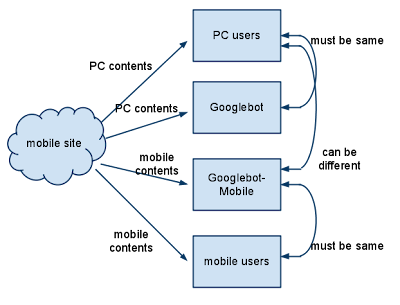
So what does "the page that the user sees" mean if you provide both versions with a URL? As I mentioned in the previous post, Google uses "Googlebot" for web search and "Googlebot-Mobile" for mobile search. To remain within our guidelines, you should serve the same content to Googlebot as a typical desktop user would see, and the same content to Googlebot-Mobile as you would to the browser on a typical mobile device. It's fine if the contents for Googlebot are different from the one for Googlebot-Mobile.

One example of how you could be unintentionally detected for cloaking is if your site returns a message like "Please access from mobile phones" to desktop browsers, but then returns a full mobile version to both crawlers (so Googlebot receives the mobile version). In this case, the page which web search users see (e.g. "Please access from mobile phones") is different from the page which Googlebot crawls (e.g. "Welcome to my site"). Again, we detect cloaking because we want to serve users the same relevant content that Googlebot or Googlebot-Mobile crawled.

Diagram of serving content from your mobile-enabled site


We're working on a daily basis to improve search results and solve problems, but because the relationship between PC and mobile versions of a web site can be nuanced, we appreciate the cooperation of webmasters. Your help will result in more mobile content being indexed by Google, improving the search results provided to users. Thank you for your cooperation in improving the mobile search user experience.

The comments you read here belong only to the person who posted them. We do, however, reserve the right to remove off-topic comments.

19 comments:

jeanthibca said...

What if the PC version is a Flash (w/o an alternative HTML version) and the mobile version is plain HTML. Would it be considered as cloaking?

Manuel said...

but you're using the html version for the google bots...

analytics said...

if m.domain.com and www.domain.com serve mobile and www versions respectively, would it be ok to use a canonical tag on the mobile pages that point to the www page?

zealus.com said...

The problem I see is that with plenty of difference in html code it would be really hard to tell one from another. Add ads galore on PC version versus almost no ads for mobile and you have a recipe for disaster.

mytech said...

Hi, in my example I have the domain.com and m.domain.com. At the beginning when a mobile client calls domain.com and m.domain.com, then I have delivered the mobile version "m.domain.com". If an normal client calls the mobile version with "m.domain.com", then I deliver the mobile version too (its the same for google normal bot). But now both normal and mobile versions are availible in the google standart results and my site was penalized. Is it posible that, this is the problem, that I have allow the google normal bot to access the mobile site, and not redirect him automaticaly to the normal site?

3 Days ago I have write an reconsideration request and disallow the access for the google normal bot to the mobile version with an redirect 302 to the normal website.

How do You thing? Is it posible, that thatswhy my site was penalized? What can I do if it's so? I have write an reconsideration request, but if this not helps? Should I shutdown the mobile version?

Thanks for your help!

thudord said...

Let's say that I want to make a mobile version of my website. On my normal website I have about 700000 links. Now the question : adding a m.domain.com and all the normal links transformed into mobile content will generate 700000 new links for google to index. How can I do this without being penalized for adding to many links?

If I stop google from indexing these pages from .htaccess file, then all this mobile content wont aprear in mobile searches. If I index a few pages a day, let's say 200 then it will take me forever to add all these pages.

I will appreciate any suggestion.

Tudor Dornean.

Irine said...

Can you please clarify what type of redirect you recommend using? 301 or 302???

Ken Kowalsky said...

Do you (or anyone else) know of a website where you can see what your website looks like from the standpoint of both desktop and mobile device users?

Tim said...

http://iphonepreviewer.com/safari/ will show your web page as it will look on an iphone.

VaBeachKevin said...

I am also interested in what type of redirect is suggested. 301, 302, or is there some other code to specify a mobile device redirect?

davidfricks said...

I too would like to know what type is preferred. For SEO the usual answer is 301 but it looks like many sites including gmail.com use a 302.

insomnia said...

we utilize SSI to detect and simply include the correct version of the page to display based off of user agent strings, thus both desktop and mobile versions of a given page have the same url. both have the same content just formatted differently. thoughts on this?

mcsquare.me said...

if you wish o create a mobile version of yopuur site and want to do it the easiest and fastest way you can imagine, you shoul check: http://gmbhnews.com/make-mobile-site/ , it's the easiest and best mobile tool I know.

Marcin said...

can you please confirm what redirection type you recommend: 301 or 302 ? cheers

Prayag Verma said...

I want to redirect my blog to its mobile version (the one google provides ,as it is not being detected by Mobiles normally) .Please give me the code for that purpose.

Like if my Blog URL is blogname.blogspot.com

I want it to redirect to blogname.blogspot.com/?m=1

Satya said...

Awesome post . help me to understand the concept of the mobile browsing.

All Vinyl Siding and Windows Greensboro NC said...

I am using Google sites for my web site www.allvinyl.info
How can I Point it to a different site for mobile version? I know they have a change to mobile view , but I like the mobile view I made more.

sergiuliano said...

What about websites developed with Responsive Design technology? How will google see those sites? as being mobile friendly or not ?

Google Webmaster Central said...

Hi everyone,

Since over a year has passed since we published this post, we're closing the comments to help us focus on the work ahead. If you still have a question or comment you'd like to discuss, free to visit and/or post your topic in our Webmaster Central Help Forum.

Thanks and take care,
The Webmaster Central Team