Monday, October 13, 2008 at 2:03 PM
Ever since we released the crawl errors feature in Webmaster Tools, webmasters have asked for the sources of the URLs causing the errors. Well, we're listening! We know it was difficult for those of you who wanted to identify the cause of a particular "Not found" error, in order to prevent it in the future or even to request a correction, without knowing the source URL. Now, Crawl error sources makes the process of tracking down the causes of "Not found" errors a piece of cake. This helps you improve the user experience on your site and gives you a jump start for links week (check out our updated post on "Good times with inbound links" to get the scoop).
In our "Not Found" and "Errors for URLs in Sitemaps" reports, we've added the "Linked From" column. For every error in these reports, the "Linked From" column now lists the number of pages that link to a specific "Not found" URL.

Clicking on an item in the "Linked From" column opens a separate dialog box which lists each page that linked to this URL along with the date it was discovered. The source URL for the 404 can be within or external to your site.

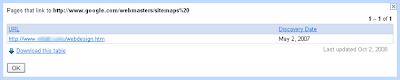
For those of you who just want the data, we've also added the ability to download all your crawl error sources at once. Just click the "Download all sources of errors on this site" link to download all your site's crawl error sources.

Again, if we report crawl errors for your website, you can use crawl error sources to quickly determine if the cause is from your site or someone else's. You'll have the information you need to contact them to get it fixed, and if needed, you can still put in place redirects on your own site to the appropriate URL. Just sign in to Webmaster Tools and check it out for your verified site. You can help people visiting your site—from anywhere on the web—find what they're looking for.
In our "Not Found" and "Errors for URLs in Sitemaps" reports, we've added the "Linked From" column. For every error in these reports, the "Linked From" column now lists the number of pages that link to a specific "Not found" URL.
Clicking on an item in the "Linked From" column opens a separate dialog box which lists each page that linked to this URL along with the date it was discovered. The source URL for the 404 can be within or external to your site.

For those of you who just want the data, we've also added the ability to download all your crawl error sources at once. Just click the "Download all sources of errors on this site" link to download all your site's crawl error sources.

Again, if we report crawl errors for your website, you can use crawl error sources to quickly determine if the cause is from your site or someone else's. You'll have the information you need to contact them to get it fixed, and if needed, you can still put in place redirects on your own site to the appropriate URL. Just sign in to Webmaster Tools and check it out for your verified site. You can help people visiting your site—from anywhere on the web—find what they're looking for.


97 comments:
hi im not sure if this is the right place to ask, but currently in my sitemaps google webmaster tools, i encounter this error below and it wont crawl the RSS of my site for some reason. the address blog/?feed=rss2 isn't the feedburner rss i use, but i can't find the option to change the address in the tools site. would you know how i can do this? would appreciate your help. thank you.
blog/?feed=rss2
RSS Feed 53 minutes ago Errors 1
This is a very welcome addition to Webmaster Tools, thank you. I had been scratching my head with URL not found messages on Webmaster Tools before this.
Now, I still get a URL not found error, and the pop-up shows the "Discovery Date" is Jun 13, 2008, and the link is from two of my own pages. However, the "Problem detected on" date is Sep 21, 2008. I checked (and double checked) - all links pointing to the URL were removed in August!
Just curious - does that mean Google is crawling the pages but not verifying rectified broken links?
I didn't know where my crawl errors were coming from, but now I do... I added page-tagging for Google Analytics with the command trackpageview(../../..); Somehow the tag I give in this command is seen as a link, but I only use it to group pages within Google Analytics.
Thank you!
This removes a big source of frustration. Keep up the good work!
Woohoo! The best news I've had in ages. Thank you so much!!!
Glad to read that finally this functionality requested by tons of users (me included) has been finally implemented.
I don't see it my WMT yet, but I think is a simple delay of the upgrading process.
Bye
Andrea
Nice, but there's a problem -- whenever you close the in-page popup dialog (the one after clicking "pages") the page will scroll way up to the top again. So if you want to click on pages one by one in the list, you'll always lose your last point of focus.
Thank you for this feature - I was waiting for this. Knowing which all broken links were linked to without knowing which page linked to it was next to useless for me.
This is a good news! thanx!
Very useful! However, I've just been through the whole list for one of my sites and it says that I have 51 links to index.htm (when my homepage is index.html). I've just been to all of them and checked the source and they are all just linking to the domain name (no index. anything in the code). Surely this is not good for my site as Google now thinks it has 51 links to a dead page?? If this was fixed it would be a great tool!
THANK YOU! This is a great addition.
This is a great feature that I use extensively. I had a bunch of problems with http://www.dannedelko.com which I had created myself through testing rewrite rules with mod_rewrite and Apache.
Webmaster tools helped me track down many of problems. So this leads to the answer to the question: Does implementing a Google XML sitemap help increase your rankings?
Well no.
But yes. Since you can see mistakes you are making on your doain, repair them and properly lead Googlebot through the site, get better more accurate indexing.
Love the answer, well no but yes!
- Dan Nedelko
Finally. nice addition
Hi, I thought I could track down all of the reported 404s at last - but it turns out the links are from other pages which also don't exist in my site any more!
Also, I've started getting 'Google Alerts' about some of these non-existent pages ... anyone suggest what might be wrong?
Excellent feature. It will help with SEO and with general web usability.
How's about providing the source URLs for the 'In external links to your site' section of 'What Googlebot sees'? For instance at the moment a webmaster can expand on a phrase to see its upper case & lower case variations but cannot see which URLs contain these phrases in links to their site. The 'Pages with external links' section would work well if integrated with some anchor text information.
Good job on this feature though.
This is an awesome addition to webmaster tools. It was always a little tricky to do this with various analytics tools I've worked with which led us to create our own various solutions to tracking and fixing 404s. Eventually we "productized" it into www.errorlytics.com - which is in beta right now with free access if anyone who is interested in this subject matter would like to try it and shoot us some feedback. It actually lets you fix the 404s once it, or google webmaster tools finds the source of the 404s. It lets you auto"magically" create search engine friendly 301 redirects without have to know regex or dig into your .htaccess file every time you need to correct a 404.
Thank you
David
Hi,
This is brilliant. Something I have been requesting and waiting for since quite some time. A big thank you to the Google Webmaster team.
Keep up the good work.
Google rocks!!!
A nice feature, really useful!
Many thanks Google :)
I have a similar problem as Steve E posted. Anyway to correct this?
Steve E said...
Very useful! However, I've just been through the whole list for one of my sites and it says that I have 51 links to index.htm (when my homepage is index.html). I've just been to all of them and checked the source and they are all just linking to the domain name (no index. anything in the code). Surely this is not good for my site as Google now thinks it has 51 links to a dead page?? If this was fixed it would be a great tool!
This sounds like a great tool to use. Thanks for the heads up.
Hi,
Nice added service and very useful one, it is very helpful.
But after that "Linked From" is added, I don't see crawled date after I login to GWT.
More in http://groups.google.com/group/Google_Webmaster_Help-Indexing/browse_thread/thread/1edee281f2d85dfc#
thankyou,
I am trying to get my website http://www.hireweddingcar.co.uk/ up the on to the 1st page of Google, Google says l have errors, l do not totally understand everything about Google but l am trying to learn, l want my website to feature for wedding car and other wedding related wedding car search phrases, can you help.
I like this newest addition to to the webmaster tools. It was definitely necessary.
But there is a problem with your tool. It informs me that I have 86 broken links, which truely are not broken, and then it lists the sources for these broken links as pages that I have removed long ago, and do not exist. So the sources of my 404 errors pull 404 errors themselves.
My bosses check the webmaster tools just like me. They ask why it says so many broken links and they become panicky, and I have to tell them, "I don't know what the deal is, our link structure is almost perfect, Google' software is faulty."
Awesome new feature!
I am finding that when I click on the X Pages Linked From links, I get an error message, rather than the URLs:
Our system is currently busy. Please try again in a few minutes.
Seems this might be a bug, no amount of time or refreshing fixes this error.
Hope you can look into this.
Thanks!
I have used this its great matt :-)
Would be cool if google could make a tool that sets a page that was not found to the url root :-) you could set a custom 404 in webmasters tools something like for example when you can tell google to include www. or just http://site
"Hi, I thought I could track down all of the reported 404s at last - but it turns out the links are from other pages which also don't exist in my site any more!
Also, I've started getting 'Google Alerts' about some of these non-existent pages ... anyone suggest what might be wrong?"
I agree this is a great new facility but ther inclusion of old links which have long gone, does make it more difficult to trace where the old link comes from.
In many cases I have seen 6 links shown, five of which have long gone but only one still exists.
Can something be done about that?
But overall great to see this new facility.
What an excellent addition!
However I get the same issues as Click by Lavalife gets.
I also have the message
Our system is currently busy. Please try again in a few minutes.
I've been trying since yesterday.
I too have recent (problem detected on Oct 2008) errors showing from long-gone (2006!) pages; does Google do the analysis on pages cached long ago? When I check broken internal links on my site I don't get these errors.
I also get external errors for people linking to www.peteranne.it/index.html (we don't have index.html, but index.htm), but if I go an look at this pages, the people link to www.peteranne.it...any idea, therefore, why we get this error??
Does it matter that external links are pointing to your site, as far as SEO is concerned? For example, lets say you purchased a previously owned domain and create completely new pages. Will links to the now non-existent pages hurt your site rankings if they end up as 404 errors?
nice news thank you buddy this is very good news you have given when i had seen it in goggle webmaster i couldn't understand it.
It would be nice to be able to remove errors from our own Google Webmaster Tools | Overview page.
I'm seeing errors that will never be fixed. They are request parameters that have been changed and other similar changes.
Without the ability to "clean the slate" so to speak, that list of errors is going to get big and eventually useless as we would have to figure out the "real" crawl errors from the old/no longer relevant crawl errors.
Hi, I am trying to get google to index my website, but after 3 weeks i've given up! My website can be easily crawled (tested it), but if i look on igoogle at what googlebot sees, it says: "Our system is currently busy. Please try again in a few minutes" What does it mean? And how can i correct it? Any help would be appreciated! Thanks Sydney...
Sometimes it takes a while to get indexed. You just have to be patient.
Hi, I have a question… our server went down due server migration and now on one of our sites it shows over 22000 not found url’s. The site has been backup online for about a week now and I was wondering how I can remove those 22000 not found urls since all the pages are back online now ?
Thanks
As your pages get revisited by Google's crawler these errors should go away over time. If you have further questions you should post them to the Webmaster Help Forum:
http://www.google.com/support/forum/p/Webmasters?hl=en
this looks good and its showing the links for 404 pages.
how can i see the links "URLs restricted by robots.txt" errors. where can i find the information which files having restrictions in robots.
But can we remove them from google index so that SEO will improve...
Hi, I changed all the URLs in different addresses lately. And now I have got many links NOT Found in web crawl . Can anyone tell me what should I do?
hi
thanx a million
...been turning the web upside down for this info after i found out how many broken links i have on my sites...
now it will be a lot easier to fix
I don't know if this is the right place to ask but how can we remove all the not found url's from google index in a single click or a easier way...
Very good information. Thanks a lot
I am getting an error saying that I have two internal links pointing to a non-existent page called /a%3E
I cannot find any such reference looking through the source code of the supposed "culprit pages".
Where does Google get this from?
Thanks
Hi,
is there an option to generate reports using Web Master Tools and forward these onto third parties?
Your webmaster tools continually reports that my robots.txt file is restricting http://www.harmonieii.co.uk/nancymay/index.html yet the file does not contain any such disallow syntax???
I have a blog at wisconsinwhitetail.blogspot.com can someone please tell me if they find anything wrong that is crawling specific. I am not getting any issues, but crawling stats are not popping up.
Is there any way to have errors that were resolved removed? It seems that even though we've fixed some errors in links in our own pages, the errors are still showing up in Webmaster tools. The errors are fixed, why is the crawler still finding them?
When I checked my Google Webmaster Tools for web crawl, I found that there are four URLs restricted by robot.txt. What does it mean ? How to solve this error ?
Thanks for your attention and answer.
Hi,
I'm using webmaster tools from a while and satisfied very much but from last few days I'm viewing 404 pages, which sources are unavailable. is anyone also facing these types of issues...
Hi,
I'm using webmaster tools from a while and satisfied very much but from last few days I'm viewing 404 pages, which sources are unavailable. is anyone also facing these types of issues...
Thank you! Been looking for a tool to help me out and some tips. This one will do nicely especially in identifying some errors I have found.
Thanks!
Where are the crawl error sources in the new look webmaster tools? Will Google put them back please?
I see you've removed the "download all crawl errors" option in the new version of webmaster tools. Any chance of bringing this back?
I found this the singular most useful part of webmaster tools.
Just discovered 13,000 crawl errors on my 350 post WP blog. Many of the bad urls refer to real pages that have /email/contact.php appended to the correct permalink.
My guess is that some plugin is causing this? But 13,000 - that would be 30+ per page?
Google obviously has not repaired the glitch of seeing index pages as HTM extension and not the intended HTML extension. My PR dropped when my site was seen as having dozens of dead links to a index.htm page when I don't have an index.htm page. I put up a redirect index.htm page so hopefully I won't have to deal with this glitch in the future.
Hello friend,
I am working a site since 3 months but facing the problem related to this post.
I have all pages on site appx 40 and i have done all with my experience but page not indexing more than 10 in site ,i have made sitemap.xml,sitemap.html,add link in footer, social bookmarking for those pages etc.
But the page is not indexing & showing 404 errors in GOOGLE webmaster tool.
Can u please help out me with this problem?
One more questions is this the reason as we have small site, i am not getting top 10 position by priority keywords in google.com.
Looking forward to any reply with appreciate a lot.
Bug: WMT claims that 100 pages link to missing page "http://foldoc.org//index.htm" but none of the sources listed refer to that URL.
I'm facing the same problem with crawl errors that many people have noted here. I re-built a site about 18 months ago replacing all the pages however google webmaster tools is still showing 33 404 (not found) errors for pages that do not exist, linked from pages that were removed 18 months ago. I am sure this is affecting my page ranking as the site is doing very poorly in the google ranking despite my extensive SEO efforts. WTF is going on?
Thanks for the tips, however I still find crawl error at my site, but I will work on it in order to get higher quality of my site. by the the way thanks for the useful info.
IT really solved my problem Keep up the good work!
this is a very good addition to webmaster tools. keep it up.
http://www.moogle.in
Thank you!
This is a good news!
A nice feature, really useful!
Many thanks Google :)
http://www.kalejia.com
Similar to several others in this thread I'd like to report that the crawl errors show historic entries that are often no longer accurate.
This makes the report very difficult to use, nearly useless in my situation.
An improvement to filter out historical entries will make this report much better.
Not intending to sound ungrateful, these tools are otherwise fantastic.
What are you doing to fix webmaster tools from giving crawl errors on outgoing links using the new asynchronous tracking code. example: '/outgoing/www.bollingercrest.com']
domes up as a crawl error when using your new code!
Hi there!!! Let me tell you that this is a great addition but is not working for my site. Why?
It says that I have one "not found" object http://www.allcoaststransport.com/home.nxg
And two sites are pointing to this: http://www.allcoaststransport.com and http://www.allcoaststransport.com/ship.nxg (this doesn't exist at all)
But there is no link pointing at the site at all. Therefore I Don't understand this error.
This is the single error on my site what Google detects so it's embarrassing for me :)
Can you help me out in this?
Thanks!
Search in the code ... not in the design.
Hi.
There is something wrong with this NOT FOUND thing. I have 83 pages linking to index.htm however I am using index.php.
The site that is linked from dont even have the .htm extension its just linked to my domain.
Out of all the 1000 links one of them happened to be from DMOZ. I dont believe this.
is there a way to fix this? would redirect be any good?
Thank you so much!!!
I also have almost 100 Not Found pages that I fixed a while ago http:\\thefantasticmom.com
I wonder how long it takes Google to re-index them and mark them as fixed?
Crawl error 404(Not found) is on my site. I checked linked from column but it mentions unavailable Without knowing source how could i correct it.
Do it will affect crawling of other url's in sitemap.
My url wrongly shown as http://aboutlovelifehappiness.blogspot.com/2010/09/love-and-happiness-happiness-now_29.html
Original url is http://aboutlovelifehappiness.blogspot.com/2010/09/love-and-happiness-happiness-now.html
Something I'd love to have on the Crawl Errors page: I manage a site w/ millions of pages. Due to so much data we end up w/ lots of crawl errors. It would be a huge help to be able to sort the errors by "# Linked from pages"... so we could find/fix the errors effecting the most pages first. I would also love to see a sort by date detected because even after we've fixed the errors they stay on the list for quite sometime. Thanks for such a great "FREE" product!
Feature request for the Crawl Errors page:
1- sort by "# pages linked from": So the team could find/fix the widest spread errors first.
2- sort by "date detected": After we've fixed the errors they stay on the list for a while. This way we can find the errors found most recently.
Thanks for such a great free tool!
I am receiving reports of "404 (Not found)" Crawl errors in my Webmaster Tools for URLs which I am sure aren't referenced anywhere in my sites or externally.
I have checked and re-checked the pages mentioned in the "Linked from" section, which all belong to me, and am sure that they don't mention the URLs which can't be found.
So this appears to be a bug.
Is there anything I can do to resolve the problem?
i have abig problem in webmaster tools.i have read your post but i dont understand plzzz help me
http://funzmaza.blogspot.com
Is it bad to crawl errors?i observe that files or categories deleted still detect by google bot and report as crawl errors.my site http://zamboangaclassifieds.com has 40 crawl errors
I'm having a similar problem to what seems to be a common issue.
Steve E posted it first but many, many other have said there is a problem with the crawl errors. Anyway to correct this and get crawl issues to be checked again after we've fixed them? I've tried using the crawl as google bot to those pages and it comes up with a 301 redirect which is correct but the error still shows in the crawl errors section....
Steve E said...
Very useful! However, I've just been through the whole list for one of my sites and it says that I have 51 links to index.htm (when my homepage is index.html). I've just been to all of them and checked the source and they are all just linking to the domain name (no index. anything in the code). Surely this is not good for my site as Google now thinks it has 51 links to a dead page?? If this was fixed it would be a great tool!
I corrected several of the 404 errors that GWT listed for our client site, but months later, the errors are still listed under 404 errors. Doesn't Google ever update this data? Because right now, it's useless information to me, and just causes me to review the same old errors, over and over again.
Corrected 404 errors still showing up in GWT 404 report. What gives? Does GWT ever update these reports? This info is not useful unless it's current.
I don't understand why I'm showing 123 Crawl Errors 404 on pages of my site which do actually exist! Many of them tend to be on one day early March 2011. What can I do to deal with the "errors" which are in fact not errors?
Google is reporting many Crawl Errors that when we check them out most are accessible web pages. And every crawl it gets worse. How do we fix this? Website: www.brazos-walking-sticks.com
We have had the situation that unfortunately there are MANY sites in the index that need to be removed now by 404. Per day Google reports 180 of those pages.
Is there any chance to increase the de-listing speed of this pages? We suspect enormous loss of SERPs because of this unfortunate parameter pages.
How can we spped this process up?
Thanks a lot in advance,
best regards
Tobi
Apparently, at times Google uses old data when "discovering" crawl errors.
Example:
We have a site which was redesigned and uploaded in June 2010.
The whole webspace had been cleaned and a sitemap was introduced with the new design.
Now, about one year later, Google reports a 404 error which was discovered in April 2010, two months _before_ our redesign.
Apart from that, Google "discovers" missing pages (which never ever existed) linked from nowhere with such nonsensical names as:
wmbhvftgobb.html
phencgatzpugnz.html
uulryhoqgsaxj.html
All this shows that the crawl error reports of Google Webmaster Tools are currently not to be taken seriously with Google using outdated and cached data.
Maybe Google finds competent programmers in the future, who are able to fix these errors in GWT.
Need help! Getting these ERRORS. It is doubling my URLS. See below: http://gotchamovies.com/news/http://gotchamovies.com/news/best-thor-villains
It should only be http://gotchamovies.com/news/best-thor-villains
Could the sitemap be doing this? Any fixes?
I am a bit baffled by the crawl error I am getting. The URL reported (http://www.resaltatech.com/resources/AppRep/ApplicationNote_Nano_Tools_07.pdf) works just fine when I click on it in the error report. It is listed in the sitemap.xml file like all others.
Under "Details" it says: " robots.txt unreachable". The entire text of robots.txt is:
User-agent: *
Allow: /
Finally, under "Linked from" it says "unavailable".
I have checked the web site and the file is certainly reachable and downloadable.
Scratching my head ...
Where are the answers to all these questions????
The problem seems that nobody HAS GOT an answer... and Google guys don't answer neither... :-(
Great news! <3 google
Hi there,
I have a question as well and I would love if anyone can help me solve that issue or redirect me to a useful website/blog.
Here's my problem:
My website is in french and the URL ends with .fr
When we first launched the website - in March - we had a URL ending with .fr/en for 4 english pages, but after two weeks we decided to suppress all the 4 english pages and keep the website only in French.
Since last June, I've been seeing a lot of 404 errors in GWT: all of these URLS are .fr/en and the problem is that all the source sites are also .fr/en
I feel lke these URLs are generated automatically, but this can't be possible... Some of the pages didn't even exist when we created the website. Now it seems like for each normal page (.fr/xxxxxx.html) an .fr/en/xxxxx.html is generated.
I even had two pages like that generated for my PPC campaign.
I'm not sure I have beel clear enough in my explanations, but basically: I have 404 errors relative to pages that never existed and the URLs pointing to these 404 are also 404 errors.
Thanks for any help you can provide!
hi
i have a problem with my site url
this is my site http://www.totalenter10.in
and webmasters show 131 errors in urls like
some url shows feeds at the end of the url
http://www.totalenter10.in/tag/royce-da-59-success-is-certain-latest-album/feed/
http://www.totalenter10.in/tag/download-selena-gomez-when-the-sun-goes-down/feed/
these are just 2 example i have 131 more error same as these example.
plz tell me how can i remove these error and why they generate.
thanks
Hi seems like a lot of people having the problem with with crawl errors. Did someone find the solution???
I have hundreds urls that Google shows as a crawl errors, but they are not actually real urls of my site. Such urls have never been created, but if Google find them where they come from??? It effects my page ranking and I have no idea what to do.
Thank you all
I have a script to delete all 404 errors from webmaster tools. Sometimes some clients have thousand erros when change cms or htacess.
Hi,I have 4471 pages with 404 error. I red the article and tried to see if I can recognize some of error links. I found that they belong to my previous site! I mean I have installed my new page for 6 month ago or later, but still webmaster tool have the old site. How can I solve this one?
Best regards
Emil
http://www.supermarket.no
There is a long-standing bug regarding the "Crawl errors" report in Webmaster Tools.
Google appears to have difficulty parsing relative references in links, at least as far as this report is concerned.
For example, the link to the "Phrases" section of my site on the following page is generating a "page not found" crawl error in Webmaster Tools, even though the link is in a valid format and correctly points to a real page.
http://www.speakenglish.co.uk/vocab/the_human_body
The link on my page is in the format "../phrases/". This type of relative reference is perfectly valid according to the RFCs and should work. It indicates that the "phrases" folder is located one step higher up the directory tree than the current folder.
However, Google is incorrectly looking for the "phrases" folder within the current folder, so appears to be ignoring the "../" part.
It would be great if someone at Google could look into this!
hi,
I am looking this matter for along time but still Google can't solve this issue 100%. Lot of webmasters still have the issue Google is not updating the robots.txt i see this is the only problems. I think Google Team bust me look this matter very serious.
Hello,
I deleted some pages from my wordpress blog and now I have crawl errors (not found 404). What should I do so the errors will be removed?
thank you,
John
Hi everyone,
Since over a year has passed since we published this post, we're closing the comments to help us focus on the work ahead. If you still have a question or comment you'd like to discuss, free to visit and/or post your topic in our Webmaster Central Help Forum.
Thanks and take care,
The Webmaster Central Team
Post a Comment
