Webmaster Central Blog
Official news on crawling and indexing sites for the Google index
It's 404 week at Webmaster Central
Monday, August 11, 2008
This week we're publishing several blog posts dedicated to helping you with one response code: 404.
Response codes
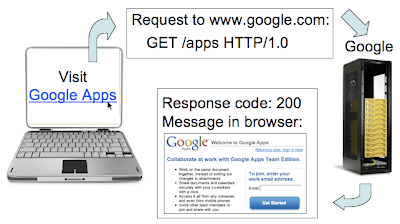
are a numeric status (like 200 for "OK", 301 for "Moved Permanently") that a webserver returns in response to a request for a URL. The 404 response code should be returned for a file "Not Found".
When a user sends a request for your webpage, your webserver looks for the corresponding file for the URL. If a file exists, your webserver likely responds with a 200 response code along with a message (often the content of the page, such as the HTML).
So what's a 404? Let's say that in the link to "Visit Google Apps" above, the link is broken because of a typing error when coding the page. Now when a user clicks "Visit Google Apps", the particular webpage/file isn't located by the webserver. The webserver should return a 404 response code, meaning "Not Found".
Now that we're all on board with the basics of 404s, stay tuned 4 even more information on making 404s good 4 users and 4 search engines.
Written by Maile Ohye, Developer Programs Tech Lead
Hey!
Check here if your site is mobile-friendly.
Labels
accessibility
10
advanced
195
AMP
13
Android
2
API
7
apps
7
autocomplete
2
beginner
173
CAPTCHA
1
Chrome
2
cms
1
crawling and indexing
158
encryption
3
events
51
feedback and communication
83
forums
5
general tips
90
geotargeting
1
Google Assistant
3
Google I/O
3
Google Images
3
Google News
2
hacked sites
12
hangout
2
hreflang
3
https
5
images
12
intermediate
205
interstitials
1
javascript
8
job search
2
localization
21
malware
6
mobile
63
mobile-friendly
14
nohacked
1
performance
17
product expert
1
product experts
2
products and services
63
questions
3
ranking
1
recipes
1
rendering
2
Responsive Web Design
3
rich cards
7
rich results
10
search console
35
search for beginners
1
search queries
7
search results
140
security
12
seo
3
sitemaps
46
speed
6
structured data
33
summit
1
TLDs
1
url removals
1
UX
3
verification
8
video
6
webmaster community
24
webmaster forum
1
webmaster guidelines
57
webmaster tools
177
webmasters
3
youtube channel
6
Archive
2020
Nov
Oct
Sep
Aug
Jul
Jun
May
Apr
Mar
Feb
Jan
2019
Dec
Nov
Oct
Sep
Aug
Jul
Jun
May
Apr
Mar
Feb
Jan
2018
Dec
Nov
Oct
Sep
Aug
Jul
Jun
May
Apr
Mar
Feb
Jan
2017
Dec
Nov
Oct
Sep
Aug
Jun
May
Apr
Mar
Feb
Jan
2016
Dec
Nov
Oct
Sep
Aug
Jun
May
Apr
Mar
Jan
2015
Dec
Nov
Oct
Sep
Aug
Jul
May
Apr
Mar
Feb
Jan
2014
Dec
Nov
Oct
Sep
Aug
Jul
Jun
May
Apr
Mar
Feb
Jan
2013
Dec
Nov
Oct
Sep
Aug
Jul
Jun
May
Apr
Mar
Feb
Jan
2012
Dec
Nov
Oct
Sep
Aug
Jul
Jun
May
Apr
Mar
Feb
Jan
2011
Dec
Nov
Oct
Sep
Aug
Jul
Jun
May
Apr
Mar
Feb
Jan
2010
Dec
Nov
Oct
Sep
Aug
Jul
Jun
May
Apr
Mar
Feb
Jan
2009
Dec
Nov
Oct
Sep
Aug
Jul
Jun
May
Apr
Mar
Feb
Jan
2008
Dec
Nov
Oct
Sep
Aug
Jul
Jun
May
Apr
Mar
Feb
Jan
2007
Dec
Nov
Oct
Sep
Aug
Jul
Jun
May
Apr
Mar
Feb
Jan
2006
Dec
Nov
Oct
Sep
Aug
Feed
Follow @googlewmc
Give us feedback in our
Product Forums
.
Subscribe via email
Enter your email address:
Delivered by
FeedBurner