Google Webmaster Central Blog - Official news on crawling and indexing sites for the Google index

It's 404 week at Webmaster Central

Monday, August 11, 2008 at 1:40 PM

This week we're publishing several blog posts dedicated to helping you with one response code: 404.

Response codes are a numeric status (like 200 for "OK", 301 for "Moved Permanently") that a webserver returns in response to a request for a URL. The 404 response code should be returned for a file "Not Found".

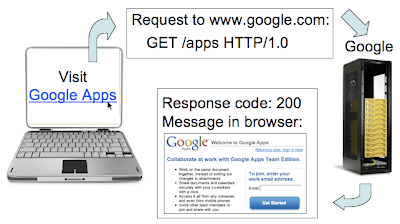
When a user sends a request for your webpage, your webserver looks for the corresponding file for the URL. If a file exists, your webserver likely responds with a 200 response code along with a message (often the content of the page, such as the HTML).

200 response code flow chart


So what's a 404? Let's say that in the link to "Visit Google Apps" above, the link is broken because of a typing error when coding the page. Now when a user clicks "Visit Google Apps", the particular webpage/file isn't located by the webserver. The webserver should return a 404 response code, meaning "Not Found".

404 response code flow chart


Now that we're all on board with the basics of 404s, stay tuned 4 even more information on making 404s good 4 users and 4 search engines.

The comments you read here belong only to the person who posted them. We do, however, reserve the right to remove off-topic comments.

25 comments:

Willem said...

I wonder if one should call themselves a webmaster if one doesn't know this very basic stuff...

wilhel1812 said...

I kinda agree with you there, but this is an intro to a big topic they'll go deeper into i guess...

Nick said...

I clicked and read this article and was shocked that it didn't actually explain anything other than what a 404 is. But I assume they will be releasing tid bits each day since its 404 week. rofl!

Jennifer Mathews Somogyi said...

You'd be surprise at how many webmasters don't know what a 404 is. Many developers are shocked I actually know what a 404 is or a server side 301 redirect (good SEO) vs. a client redirect (bad) :o)

liviu said...

can somebody help me with the php code used to return a 404?
it is ok if beside the 404 status i return a text message to? are the 404 pages (with nonstandard errors) indexed by google?

krusch said...

@liviu

You can set the response code using the header function (this has to be the first header you set!)

header("HTTP/1.1 404 Not found");

See http://de.php.net/header for details about the header function.

You can (and should) include content too, search engines will typically not index a page that returns a 404. Although not required you can also add a robots meta tag with noindex.

Tito said...

Here's an ironic post addressing Google's 404 error pages not following Google's own guidelines (found in the Google Webmaster Help Center) for creating useful custom 404 pages...

Google's 404 Error Page: Not Good, Not Effective, and Not Google Friendly (According to Google's Guidelines)

http://www.plumbersurplus.com/Blog/post/2008/06/Googles-404-Error-Page-Not-Good2c-Not-Effective2c-and-Not-Google-Friendly-(According-to-Googles-Guidelines).aspx

Mark said...

Question - Let's say I create a Friendly 404 page that has a bunch of useful links on the page to other related content. I have the meta robots tag defined as: meta name="robots" content="noindex,follow"

Will Google follow the links on a 404 error page?

Damien said...

I would like confirmation about the links on a hard 404. Are these links treated the same as other website links? If we serve up contextually relevant 404 error pages for example then each of our error pages will have different unique links...would love confirmation that the time taken to implement is not wasted effort. Thanks

master said...

It's clearly explained here..

support: Meet new friends | Free call and Free SMS

KamaZee said...

But what about 410? There are some cases when 410 suits more than 404.
Does googlebot understand it correctly?

Jason said...

Willem, you wasted 15 seconds of lifes precious time just to type that? I think I know of someone who can help you.

Deric Loh said...

Instead of just showing the user the "404" page.....try adding something like "Can't find what you're looking for ? Here's some recommendation from us...." providing end users some form of alternative solution, instead of just losing them on the spot.

Deric Loh said...
This comment has been removed by the author.
bala said...

http://rdxgirl.blogspot.com/

Genoc da Boom said...

Really interesting, now i know little bit of 404 page

passionforpuzzles said...

Added to my 404 error page. See PassionForPuzzles.com

Ken said...

This works great. We've added it to our site. Bad link example: http://www.blastam.com/web-application-dveelopment.aspx

A. Michael Bussek said...

How to change for the better in blogger.com when a deleted blog post becomes a 404?

http://preeedict.blogspot.com/2008/08/nostradamus-obama-mccain-and-mabus.html

Raj said...

404 for Google too!

Check the link at the Google Homepage, today, for "Haunted by high energy costs? Here are some easy ways to save," returns 404! Great!

Raj
MT Herald

Azhar Iqbal said...

Great Information Sir.

Alabama Real Estate Professional said...

I have a question that have been bugging me for a while. In Google webmaster central i am getting a 404 for this page - http://www.cardownloan.com/bad-credit-car-loan/connecticut.php and all the other states.

However, all the links are active and correct. Apart from wrong link, what other reasons there are for 404s

Kathryn Senior said...

I am still a learning webmaster and have a problem with 5 pages on my site that can't be found. I can see from the webmaster tools what the address of the lost urls used to be but I don't know how to find the links in the site that point to them. Problem arose when I changed the naming system for pages in the site.

Sorry for the non technical question but can anyone give me a clue of how to discover this without having to check every page

Thanks you
Kathryn

krusch said...

@Kathryn Senior

The server logs are probably the easiest way to find out which non-existing pages are still accessed; typically the log also includes the URL of the referring page.

You can also find some referring pages in the webmaster console under Diagnostics > Web crawl.

Maile Ohye said...

Hi everyone,

Since some time has passed since we published this post, we're closing the comments to help us focus on the work ahead. If you still have a question or comment you'd like to discuss, free to visit and/or post your topic in our Webmaster Help Forum.

Thanks and take care,
The Webmaster Central Team