Tuesday, April 17, 2007 at 4:04 PM
Note: The user-interface of the described features has changed.
As a site owner, you control what content of your site is indexed in search engines. The easiest way to let search engines know what content you don't want indexed is to use a robots.txt file or robots meta tag. But sometimes, you want to remove content that's already been indexed. What's the best way to do that?
As always, the answer begins: it depends on the type of content that you want to remove. Our webmaster help center provides detailed information about each situation. Once we recrawl that page, we'll remove the content from our index automatically. But if you'd like to expedite the removal rather than wait for the next crawl, the way to do that has just gotten easier.
For sites that you've verified ownership for in your webmaster tools account, you'll now see a new option under the Diagnostic tab called URL Removals. To get started, simply click the URL Removals link, then New Removal Request. Choose the option that matches the type of removal you'd like.
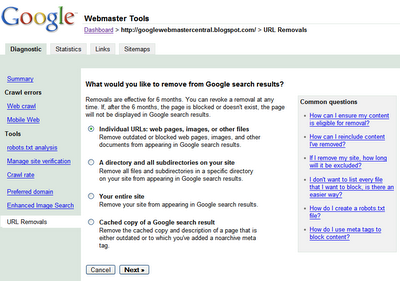
Individual URLs
Choose this option if you'd like to remove a URL or image. In order for the URL to be eligible for removal, one of the following must be true:
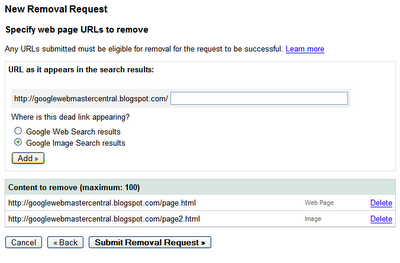
Once the URL is ready for removal, enter the URL and indicate whether it appears in our web search results or image search results. Then click Add. You can add up to 100 URLs in a single request. Once you've added all the URLs you would like removed, click Submit Removal Request.
A directory
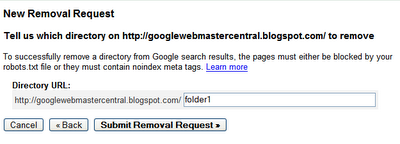
Choose this option if you'd like to remove all files and folders within a directory on your site. For instance, if you request removal of the following:
http://www.example.com/myfolder
this will remove all URLs that begin with that path, such as:
http://www.example.com/myfolder
http://www.example.com/myfolder/page1.html
http://www.example.com/myfolder/images/image.jpg
In order for a directory to be eligible for removal, you must block it using a robots.txt file. For instance, for the example above, http://www.example.com/robots.txt could include the following:
User-agent: Googlebot
Disallow: /myfolder
Your entire site
Choose this option only if you want to remove your entire site from the Google index. This option will remove all subdirectories and files. Do not use this option to remove the non-preferred version of your site's URLs from being indexed. For instance, if you want all of your URLs indexed using the www version, don't use this tool to request removal of the non-www version. Instead, specify the version you want indexed using the Preferred domain tool (and do a 301 redirect to the preferred version, if possible). To use this option, you must block the site using a robots.txt file.
Cached copies
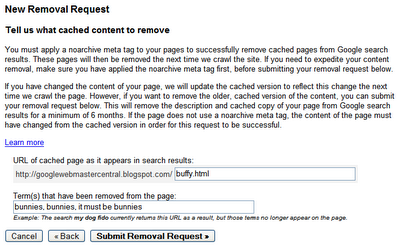
Choose this option to remove cached copies of pages in our index. You have two options for making pages eligible for cache removal.
Using a meta noarchive tag and requesting expedited removal
If you don't want the page cached at all, you can add a meta noarchive tag to the page and then request expedited cache removal using this tool. By requesting removal using this tool, we'll remove the cached copy right away, and by adding the meta noarchive tag, we will never include the cached version. (If you change your mind later, you can remove the meta noarchive tag.)
Changing the page content
If you want to remove the cached version of a page because it contained content that you've removed and don't want indexed, you can request the cache removal here. We'll check to see that the content on the live page is different from the cached version and if so, we'll remove the cached version. We'll automatically make the latest cached version of the page available again after six months (and at that point, we likely will have recrawled the page and the cached version will reflect the latest content) or, if you see that we've recrawled the page sooner than that, you can request that we reinclude the cached version sooner using this tool.
Checking the status of removal requests
Removal requests show as pending until they have been processed, at which point, the status changes to either Denied or Removed. Generally, a request is denied if it doesn't meet the eligibility criteria for removal.
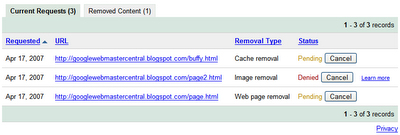
To reinclude content
If a request is successful, it appears in the Removed Content tab and you can reinclude it any time simply by removing the robots.txt or robots meta tag block and clicking Reinclude. Otherwise, we'll exclude the content for six months. After that six month period, if the content is still blocked or returns a 404 or 410 status message and we've recrawled the page, it won't be reincluded in our index. However, if the page is available to our crawlers after this six month period, we'll once again include it in our index.
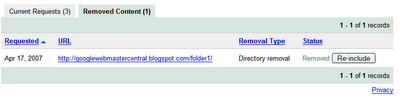
Requesting removal of content you don't own
But what if you want to request removal of content that's located on a site that you don't own? It's just gotten easier to do that as well. Our new Webpage removal request tool steps through the process for each type of removal request.
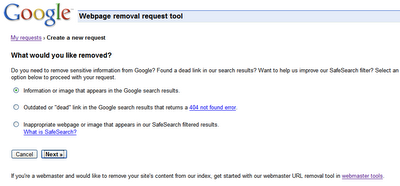
Since Google indexes the web and doesn't control the content on web pages, we generally can't remove results from our index unless the webmaster has blocked or modified the content or removed the page. If you would like content removed, you can work with the site owner to do so, and then use this tool to expedite the removal from our search results.
If you have found search results that contain specific types of personal information, you can request removal even if you've been unable to work with the site owner. For this type of removal, provide your email address so we can work with you directly.
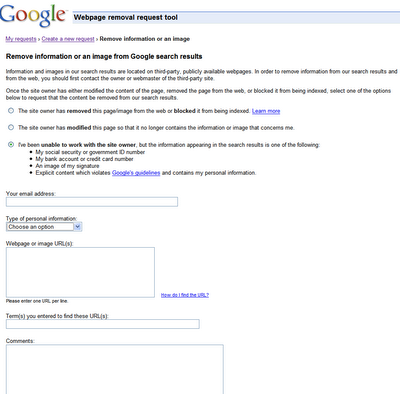
If you have found search results that shouldn't be returned with SafeSearch enabled, you can let us know using this tool as well.
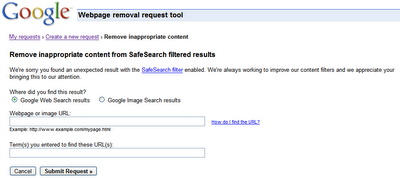
You can check on the status of pending requests, and as with the version available in webmaster tools, the status will change to Removed or Denied once it's been processed. Generally, the request is denied if it doesn't meet the eligibility criteria. For requests that involve personal information, you won't see the status available here, but will instead receive an email with more information about next steps.
What about the existing URL removal tool?
If you've made previous requests with this tool, you can still log in to check on the status of those requests. However, make any new requests with this new and improved version of the tool.

As always, the answer begins: it depends on the type of content that you want to remove. Our webmaster help center provides detailed information about each situation. Once we recrawl that page, we'll remove the content from our index automatically. But if you'd like to expedite the removal rather than wait for the next crawl, the way to do that has just gotten easier.
For sites that you've verified ownership for in your webmaster tools account, you'll now see a new option under the Diagnostic tab called URL Removals. To get started, simply click the URL Removals link, then New Removal Request. Choose the option that matches the type of removal you'd like.

Individual URLs
Choose this option if you'd like to remove a URL or image. In order for the URL to be eligible for removal, one of the following must be true:
- The URL must return a status code of either 404 or 410.
- The URL must be blocked by the site's robots.txt file.
- The URL must be blocked by a robots meta tag.
Once the URL is ready for removal, enter the URL and indicate whether it appears in our web search results or image search results. Then click Add. You can add up to 100 URLs in a single request. Once you've added all the URLs you would like removed, click Submit Removal Request.A directory
Choose this option if you'd like to remove all files and folders within a directory on your site. For instance, if you request removal of the following:
http://www.example.com/myfolder
this will remove all URLs that begin with that path, such as:
http://www.example.com/myfolder
http://www.example.com/myfolder/page1.html
http://www.example.com/myfolder/images/image.jpg
In order for a directory to be eligible for removal, you must block it using a robots.txt file. For instance, for the example above, http://www.example.com/robots.txt could include the following:
User-agent: Googlebot
Disallow: /myfolder
Your entire siteChoose this option only if you want to remove your entire site from the Google index. This option will remove all subdirectories and files. Do not use this option to remove the non-preferred version of your site's URLs from being indexed. For instance, if you want all of your URLs indexed using the www version, don't use this tool to request removal of the non-www version. Instead, specify the version you want indexed using the Preferred domain tool (and do a 301 redirect to the preferred version, if possible). To use this option, you must block the site using a robots.txt file.
Cached copies
Choose this option to remove cached copies of pages in our index. You have two options for making pages eligible for cache removal.
Using a meta noarchive tag and requesting expedited removal
If you don't want the page cached at all, you can add a meta noarchive tag to the page and then request expedited cache removal using this tool. By requesting removal using this tool, we'll remove the cached copy right away, and by adding the meta noarchive tag, we will never include the cached version. (If you change your mind later, you can remove the meta noarchive tag.)
Changing the page content
If you want to remove the cached version of a page because it contained content that you've removed and don't want indexed, you can request the cache removal here. We'll check to see that the content on the live page is different from the cached version and if so, we'll remove the cached version. We'll automatically make the latest cached version of the page available again after six months (and at that point, we likely will have recrawled the page and the cached version will reflect the latest content) or, if you see that we've recrawled the page sooner than that, you can request that we reinclude the cached version sooner using this tool.
Checking the status of removal requestsRemoval requests show as pending until they have been processed, at which point, the status changes to either Denied or Removed. Generally, a request is denied if it doesn't meet the eligibility criteria for removal.

To reinclude content
If a request is successful, it appears in the Removed Content tab and you can reinclude it any time simply by removing the robots.txt or robots meta tag block and clicking Reinclude. Otherwise, we'll exclude the content for six months. After that six month period, if the content is still blocked or returns a 404 or 410 status message and we've recrawled the page, it won't be reincluded in our index. However, if the page is available to our crawlers after this six month period, we'll once again include it in our index.
Requesting removal of content you don't ownBut what if you want to request removal of content that's located on a site that you don't own? It's just gotten easier to do that as well. Our new Webpage removal request tool steps through the process for each type of removal request.
Since Google indexes the web and doesn't control the content on web pages, we generally can't remove results from our index unless the webmaster has blocked or modified the content or removed the page. If you would like content removed, you can work with the site owner to do so, and then use this tool to expedite the removal from our search results.If you have found search results that contain specific types of personal information, you can request removal even if you've been unable to work with the site owner. For this type of removal, provide your email address so we can work with you directly.

If you have found search results that shouldn't be returned with SafeSearch enabled, you can let us know using this tool as well.
You can check on the status of pending requests, and as with the version available in webmaster tools, the status will change to Removed or Denied once it's been processed. Generally, the request is denied if it doesn't meet the eligibility criteria. For requests that involve personal information, you won't see the status available here, but will instead receive an email with more information about next steps.What about the existing URL removal tool?
If you've made previous requests with this tool, you can still log in to check on the status of those requests. However, make any new requests with this new and improved version of the tool.



62 comments:
This a great tool. Unfortunately it was not available 4 days ago when I requested the old Google tool to remove my site from the Index. I was just attempting to control our brand.
Now I've removed the entire site and the Google remove tool will not let me reinclude it. Who do I have to pay to get my site re-indexed. I cannot wait 180 days.
I will migrate my entire domain to www.flyupload.org if it that is the fastest way to get my PageRank back.
Khalid
408 712 3580
WOW! this is great! Adam had hinted that big things were coming, and this is great.
This is top, knew this webmaster console would become a great tool
Awesome, thanks! That was asked for since the stone age and I think it is worth every minute of waiting :)
.
> Your entire site
You can also remove someone else's entire site from Google.
In the US, the best way is to send a Digital Millennium Copyright Act infringement notification. This is how The Church of Scientology was able to remove Xenu.net, for instance:
http://www.google.com/dmca.html
In Germany, you can send a notice to the Association for the Voluntary Self-Monitoring of Multimedia Service Providers. Google Germany agreed to their "Subcode of Conduct for Search Engine Providers," which means that sites like stormfront.org are completely censored in Google.de. The infringement notification form is here:
http://www.fsm.de/de/Beschwerdeformular
In China, you can also get someone else's entire site removed from Google by being a government member. For instance, all pages of government-critical Human Rights Watch (hrw.org) are missing on Google.cn. Google does not disclose how exactly the process works, but a good start is to find out more about the Chinese government:
http://en.wikipedia.org/wiki/Government_of_the_People's_Republic_of_China
.
The Removal Tool is great but also dangerous ... what if someonehacks into my sitemaps account and removes my all site from the index.
To prevent this, we should automatically receive an EMAIL ALERT when the removal tool is used :-)
> what if someonehacks into my
> sitemaps account and removes my
> all site from the index.
GoogleFan, this won't suffice, the person will also need to hack into your server and make sure to send 404s etc. And if someone hacks your Google Account and your server, not being indexed in Google is probably the least you will have to worry about...
This is great!
However, I wasn't able to locate a link to "Webpage removal request tool" (http://www.google.com/webmasters/tools/removals) anywhere in Webmaster tools. Where is it? Perhaps you forgot to include it?
This sounds great, but I am a little curious about the sentence "After that six month period, if the content is still blocked or returns at 404 or 410 status message and we've recrawled the page, it won't be reincluded in our index." ( emphasis mine )
What if you haven't recrawled the page ? If you remove a page from your website, you are also likely to remove any links to that page, so there is a very good chance that Google would not recrawl the page. Will the page then automatically reappear in the index, even if it is still blocked through robots.txt, 410 error code etc ?
This was the case with the old removal tool, where 6 months after removing a page from the index it would reappear with a cached copy from before the page was removed, no matter whether the page returned a 404 error, 410 error, robots.txt or meta tag exclusion.
Will this be improved in the new tool ?
Great tool! I haven't done much in the past with robot excludes, but this seems to have just made the process clearer for eager webmasters. I'll definitely have to dabble with it more in the future. Thank you.
Dear Google Webmaster Central team,
I found it great to have the content removal tool integrated by now.
However, I think there is still a bug, because it didn't work as - I think - supposed to.
In my case the robots.txt of the entire domain - which I wanted to remove from the index - blocks all crawlers.
Google Webmaster Central confirms it itself on the welcome page:
"We can't currently access your home page because of a robots.txt restriction."
After requesting the "site removal" manually for "sublevel1.sublevel2.domain.TLD" after hours I receive the message "Your request may have been denied because... you must do one of the following: - 404/410, - robots.txt-block, -noindex-meta"
What happened here?
The three conditions are named as "OR" conditions and the blocking robots.txt is in place.
Why now the denial?!?
Thanks for looking into it...
Regards
Dirk
Hi Dirk,
What site are you trying to remove?
Hi Vanessa,
thanks for asking.
I'd rather let you know the domain-name without posting it here.
Because my intention is to "withdraw it from public", not to push people to it... ;-)
I now added my PM behind my blogger-profile.
Excellent! Thanks a lot! This will help tremendously.
This tool DOES NOT WORK! My page's status is reported in the tool as "Removed", but reference to it continues to appear in the index. How can this be? I have a robots.txt file in the directory and have resubmitted the request, but the item persists. To whom does one appeal now?
It's a real shame that there's no instant reinclusion metjod. After years of enjoying good rankings in Google, my site was unexpectedly wiped completely from the index. My SiteMaps account only says that there are no pages currently indexed, which is obvious (there were no violations etc), but did not explain why. All that lost revenue. A new feature for instant reinclusion needs to be added before another search engine takes advantage of the situation.
Dirk, I have the exact same problem. Blocked the entire site with a robots.txt:
http://folders.sin-online.nl/robots.txt
The Google dashboard acknowledges that the robots.txt stops it from indexing the site.
Instructed Google to remove the whole site.
Result: Denied
This is definitely a bug.
Regards,
Peter
I was wondering if the URL removal tool has slowed down. I have had a removal request for 10 days and it still shows pending.
I was wondering if there were any intentions to develop an URL remover based on a certain keyword. For example, if I'd like to see every indexed entries containing the word archive removes, I would enter the keyword and press exclude. As I understand, this is up to day not possible by any means, as the robots.txt would only allow this if it were in the directory /archive/ ...
I find that the Google Webmaster tool does not allow me to work with
its "URL Removal" function properly, if the website operates on some other port which is not the default 80 (i.e. those specified in the form http://www.example.com:8080).
In particular, when I attempt to specify a particular html, pdf file
in its "Individual URLs: web pages, images, or other files" and
"Cached copy of a Google search result" options, or any directory in its "A directory and all subdirectories on your site" option, the tool keeps on prompting that the URL so specified is not correctly formatted.
I try some other sites that operates on port 80, and find no problem at all. Any possible solution?
I want to remove the cache that is 'caching' on my friendster blog. The problem i've deleted my blog but Google's cache is still there. May i know if there's any solve this problem.
Is there any way to remove all sites within a given domain (xxx.xxx) from the Google index? We've got several hundreds of subdomains that were picked up by google, that we need removed.
It's far too many to generate removal requests for manually. We've already updated the robots.txt files but Google is taking far too long to re-index all these sites. How can we remove them all at once?
Google Cache takes a while to be removed. From what I've seen its usually around a month.
Removal of index subdomains automatically. So far its not possible atleast easily. If you have a script to do it for you yes you could but that's the only way as far as I'm aware of.
I'm trying to block several directories on my site. I've implemented a Robots.txt file and requested removal, in total I'm trying to block several thousand pages. My problem though, is that its taking forever. I've been at it for a month or so and only a small percentage of pages has been correctly blocked. Also, some that have been successfully blocked and verified as being blocked by Google still remain in the index.
I guess my big question is, how long does it take to have pages blocked and completely removed? I've heard 90 days, 180 days, but I'd really like a better estimate if anyone at Google or anybody here has an idea.
Thanks.
I'm not impressed. I've requested 8 pages removed twice and each time get a "denied".
I've followed the rules by placing a robots meta of noindex on each of the pages and still receive the denial.
As far as I can tell the automated system needs work. I should not be told "denied" on a page (or pages) I've requested be deleted...it's my content, not Google's, especially after doing what was demanded.
this is great, except how do you get the stuff removed if you don't have a google account for your website?
we added the robots.txt, but that will take awhile for it to get rid of everything.
Why the URLs are not removed from the index automatically when they return 410 headers?
My clients have thousands of pages containing time related offers (cruises, flights, used cars for sale…).
We have unique pages for all those offers. Once the cruise or used car is sold, we remove it from the database and the page return correct 410 header. Page also informs the user that the offer is sold.
410 headers inform any user-agent that the "page is gone" and will never return. It is a W3C standard http://www.w3.org/Protocols/rfc2616/rfc2616-sec10.html.
I thought Google will interpret this intelligently and automatically remove pages from the index (or at least search results) but I was wrong. I can see these pages still indexed even if they were re-crawled. Google webmaster tools know about these pages and report errors. Some of these pages even rank well.
410 is not an error, it is a feature and should be interpreted accordingly.
In my view search engines to be concerned as any other user-agents should remove pages returning 410 headers immediately from their index.
I hope this will change soon.
Anyone hear me? :(
This will be no doubt a great tool to look at.. it will help us to get pages properly cached.... actually the ones which are dummy... as they make the original content which is taken after that as supplemental.
Thanks Google
These are the 2 URLS which I want removed immediately from the Search results of Google:
http://www.google.com.ph/search?hl=en&q=jason+quema&btnG=Google+Search&meta= (The first result that appears using Google search for "Jason Quema")
http://forums.ebay.ph/thread.jspa?threadID=500001637&tstart=0&mod=1186903345496 (The specific thread deleted already by Ebay.ph upon my request)
PLEASE PLEASE PLEASE do something about this matter as soon as possible!
I have requested removal of the above link/URL from the results of Google Search.
Last night, my webpage removal request tool account listed it as "PENDING."
I thought all was well because I also received a confirmatory email from the GOOGLE TEAM saying that they will look into my complaint as soon as possible.
Then, this morning, when I checked, the pending request was GONE without a trace. I thought there was supposed to be a message that the request was "DENIED" and a "LEARN MORE" link in order to find out why the removal wasn't successful.
What should I do now??? The information contained in the link is very sensitive and humiliating. I wish Google would be more efficient processing webpage removals of this nature.
I'm having a problem that doesn't seem to have been addressed previously.
I used the URL Removal tool to place a request to have a subsite removed from the index. The site has been removed from our servers so the 404 condition is true. The request is listed under removed content and our site was crawled on 8/19/07 (2 days after the request was approved), but the page and abstract information are still appearing in the search results.
What can I do to get this information removed? I work for a State agency and the information I'm trying to have removed is an SSN.
Thanks
As another user commented:
"This was the case with the old removal tool, where 6 months after removing a page from the index it would reappear with a cached copy from before the page was removed, no matter whether the page returned a 404 error, 410 error, robots.txt or meta tag exclusion.
Will this be improved in the new tool ?"
same here! only we have been noticing this since 4 years!!
"Google never removes a dead link" even if it returns 404 for years and has no links pointing to it..
I really hope they fix this bug..
I've been trying to get sensitive material off the Google cache for 4 days without success. First, the URLS submitted through the Remove URL tool were denied (even though they returned a 404), and now (after I resubmitted them) they have shown as Pending for two days. The URL is corpuslg.org.
This delay may cost my wife her job. We deleted all the sensitive pages on Oct 8, the crawler has visited the site at least 5 times, and the files (.doc, .xls and .pdf) still show up by clicking the view as HTML link.
I included the directory where the sensitive material was on a disallow line in the robots.txt but this still hasn't cleared the view as HTML cache.
Please help! We can't afford to have my wife lose her job because Google won't remove our pages off their computers.
I don't want my page removed - I just want it updated. I have changed my company contact details some time ago, but despite my site being crawled about twice a week the contacts page has not updated. Is it possible to force an update of 1 page?
It would be nice if you combined the removal tool with the Overview page where you list the urls not found. In many cases it is easy for a site owner to remove urls from their site but to submit hundreds or thousands of urls to google for removal is tedious to say the least. It would be nice to have a button inside each section (like no found urls) you could click to request all the not found urls be removed. Since all files will return a 404 there should be no problems.
I requested the webmaster to remove sensitive information from the site and he did so at the beginning of November but the copy in the Google cache was not changed. On Friday, the webmaster asked for site page removal using Webmaster tool and obtained for the requested page the status - removed. How long does it usually take to implement the changes (I still hope that the page will be deleted from Google search). I will appreciate any your suggestions.
I'd like to see an option in the webmaster tools OVERVIEW section that would allow a webmaster to click a box indicating it is ok to remove all the 404 error pages from the google index. Seems like google just keeps trying to index those pages forever either though they return a 404 (or 410) error.
Natalia:
Once Webmaster Tools shows the status of the removal request as "Removed", the change should be effective. If this is not the case, please post the details, including the URL(s) in question, in our Help Group and we can take a closer look at what's going on.
Jim:
Thanks for the suggestions. We'll take them into consideration.
I have a bunch of pages I need removed and this will help a lot. However I have a question - what if we put the page back in the future? How will Google reindex? For example, if we changed our web page from www.xxx.com/about to www.xxx.com/about_us. If for some reason we do another update in 6 months and change to /about again, what will happen?
Meg
Ok - I found the answer on another blog - it is in the index for 6 months, but doesn't display in search. After the 6 months if it still returns a 404 then it is removed from the index.
So you don't have to answer, unless this is incorrect!
Thanks,
Meg
Actually, when you request removal of a URL, it is removed from the index within a matter of days (if your request is approved), not 6 months.
If you want that URL reindexed, you need to:
a) remove any methods you used to block Google from indexing the page (robots meta tag, instructions in your robots.txt file, etc.)
b) cancel the removal request in Webmaster Tools.
Susan,
Thanks for your prompt answer.
I would like to describe the situation.
November, 1: I asked the webmaster of the site to remove the information from the site that contained private information, the documents with their ID numbers and so on related to know-how of the companies, internal documentation (the information was accidentally disclosed by the third party).
It was removed from the site and assured that the cache would be automatically updated in 10 days.
November, 22: the information was again discovered in Google cache.
November, 22: I asked the site to completely remove the page from Google index (if cache update is not possible). It was removed using Web removal tools (the screenshot of the request can be provided).
Today, the information is still there (the cache was last updated in July).
I would appreciate any your help because I really don’t know what I can do further.
P.S. I can provide two URL addresses via e-mail and screenshot of the request.
I have a client that wants a PDF that was accidentally indexed by Google removed immediately. I have the robots.txt and ROBOTS metadata blocking the page that the PDF was linked from and the directory that the PDF sits inside, though I do not see that the PDF itself supports ROBOTS metadata. (I've tried setting up a ROBOTS property for the sake of it.) The directory, web page, and cache removals are all pending.
There needs to be a way for us to signify the immediacy of a request. 3-5 days isn't fast enough in the case of sensitive personal/business data. And we definitely have to make sure that it is permanently removed and doesn't somehow magically reappear after some amount of time. Is there a live support chat/hotline which we can use to have someone look into immediate requests once we've taken care of all of the footwork necessary??
Hi, L. Reece:
The best way to make sure that sensitive documents are not accessible to either crawlers or humans is to password-protect them. This will ensure that they won't "magically reappear" in the index.
We generally feel that for any content that was publicly available long enough for us to crawl and index it, a few days is a reasonable amount of time to process a URL removal. If you encounter any problems with the removal request, feel free to let us know in our Webmaster Help Group.
You ought to provide a way to remove URLs in bulk. In Google webmasters tool (report) we see many URLs that are not found. We would like to submit all of them at once (yes, we are sure all of them will return a 404)
Now to submit one at a time is very tedious.
I cannot verify that I own my blog: http://completelackofsurprise.blogger.com.
That means I can're remove items that are cached by Google.
How am I suppsed to remove these cached items?
If your blog is hosted on Blogger, you can verify it by adding a meta tag. In your Blogger dashboard, go to Template > Edit HTML. If you need further help, please post your questions in our Webmaster Help Forum.
Question about removing info from a third party website...
Once the cached page has been removed and the site has been crawled, approximately how long does it take for the info removed to disappear from the Google search results page?
Thanks,
John
I have over 100 URL's appearing as Not Found, even after these URL's have been successfully removed with the Removal Tool and there are no links internally or externally to these pages. Is there any explanation for this?
Hello, nice post.
I use google webmasters and "yahoo webmaster", with yahoo is more easy, fast to remove old urls and directories. With Google its very dificult, and some urls need to have the 404 error.
There are an easy way? Why google make this so hard.
Thanks,
blue_megalomaniac, i have the same problem but with dinamic contents "?" and the same "learn more"
Why it is so hard,
I also use Robots.txt, but google kept the urls in index.
Any solutions?
i am in a very very tedious process right now. i moved hosting from blogger to wordpress paid hosting, and i deleted almost all posts one by one in blogger.
i tried requesting for blogger in webmasters tools to remove everything from my blogger blog, from google search results and google cache for that blogger blog.
But apparently the only and i'm not even sure if this is the effective way in the real world, althoguh google says it is, that i have to put a meta tag/robots.txt restriction and then remove one by one the URL. all of that i'm doing right now.
can't google make life for webmasters easier??it's not like google does not make money from people like us webmasters. we contribute to the google search.
i just moved, so i want the old url/blog erased to oblivion while the same content and new ones thereafter from the new blog, be the one to be indexed.
pls. google, i love everything google actually, i love gmail, i don't even use my webhost's email, i love google search of course and i think it is like a superhero, but pls. make webmasters lives like us easier.....pls. pls.. a good start is that when google webmasters tools return a 404 list in the dashboard, make an automatic way to mass delete those url's for submission to delete index and cache.
thank you
Is there a way to remove an email address permanently from Google??
Thank you
Billy
Somebody pls. help !!!
I posted a thread on a website using a name which was later changed to something else by the WebMaster of the website.
I requested Google to remove that link from 'Google Search' in order to effect new changes - but it was DENIED !
PLs. advise.
hi I noticed that some of these have been answered, good job.
I am trying to get several web pages removed from the index. I found several pages where my name was used by a link builder engine to create doorway pages for different sites. The name has been included into a dictionary file for a spammer's link builder software. I've contacted the site owners and they have removed the SEO spam from their websites. (these were generally on neglected message boards. Now that the content is gone, the site has an error, not a 400 or 404, usually generated by the bulletin board.
But the sites and my name is still coming up in the search results, even though the links are dead. How can I get these removed?
Thanks,
Ben LaGrone
Hi Ben,
You can use our public URL removal tool to request removal of this content.
If the page(s) return a 4xx status code (such as 404 or 410), select the "Outdated or 'dead' link" option.
Otherwise, select the "Information or image that appears in the Google search results" option, and then the "The site owner has modified this page" option on the next page. This will remove the cache containing any old information (such as your name).
Thanks Susan!!!
maybe you can advise on the other problem I have;
I have not been able to get all the site owners to remove the content. The Yahoo Geocities site owners are not responsive at all, and yahoo doesn't give a #$&@.
Anyway, there are about 5 sites indexed that contain text like "[my name] savings and **** crook" (I changed the text because I don't want to support the spam).
Is there a way to request removal of indexed sites that contain spam?
I've found that mentioning that the spam contains libel usually makes the removal even harder, yahoo responds that they are not responsible for content. If I only mention it as spam, then people care.
Thanks again,
Ben LaGrone
ps. there were initially 21 spam links with the text in question in the Google index, I've gotten 12 removed, 6 new ones have appeared.
Yahoo has over 80.
MS Live has almost 100
This speaks volumes to me about the comparative quality of the search engines.
If you wish to report a page as spam, you can do so in your Webmaster Tools account, or here if you don't have an account.
If you wish to get the content of those pages changed, here's our advice.
Hi everyone,
Since over a year has passed since we published this post, we're closing the comments to help us focus on the work ahead. If you still have a question or comment you'd like to discuss, free to visit and/or post your topic in our Webmaster Help Group.
Thanks and take care,
The Webmaster Central Team
Post a Comment






