Monday, February 05, 2007 at 2:37 PM
To make this data even more useful, we have divided the world of links into two types: external and internal. Let's understand what kind of links fall into which bucket.
What are external links?
External links to your site are the links that reside on pages that do not belong to your domain. For example, if you are viewing links for http://www.google.com/, all the links that do not originate from pages on any subdomain of google.com would appear as external links to your site.
What are internal links?
Internal links to your site are the links that reside on pages that belong to your domain. For example, if you are viewing links for http://www.google.com/, all the links that originate from pages on any subdomain of google.com, such as http://www.google.com/ or mobile.google.com, would appear as internal links to your site.
Viewing links to a page on your site
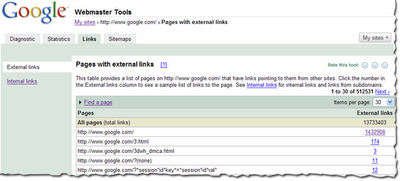
You can view the links to your site by selecting a verified site in your webmaster tools account and clicking on the new Links tab at the top. Once there, you will see the two options on the left: external links and internal links, with the external links view selected. You will also see a table that lists pages on your site, as shown below. The first column of the table lists pages of your site with links to them, and the second column shows the number of the external links to that page that we have available to show you. (Note that this may not be 100% of the external links to this page.)

This table also provides the total number of external links to your site that we have available to show you.
When in this summary view, click the linked number and go to the detailed list of links to that page.
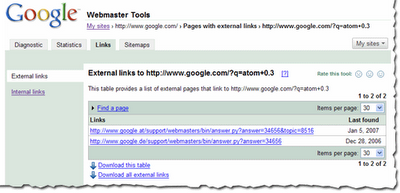
When in the detailed view, you'll see the list of all the pages that link to specific page on your site, and the time we last crawled that link. Since you are on the External Links tab on the left, this list is the external pages that point to the page.

Finding links to a specific page on your site
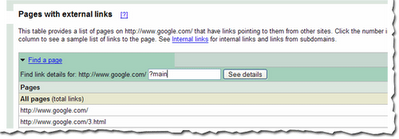
To find links to a specific page on your site, you first need to find that specific page in the summary view. You can do this by navigating through the table, or if you want to find that page quickly, you can use the handy Find a page link at the top of the table. Just fill in the URL and click See details. For example, if the page you are looking for has the URL http://www.google.com/?main, you can enter “?main” in the Find a page form. This will take you directly to the detailed view of the links to http://www.google.com/?main.

Viewing internal links
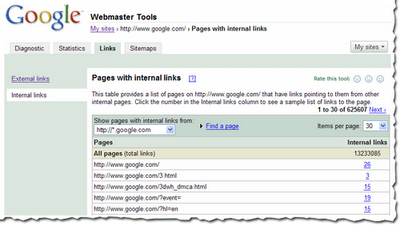
To view internal links to pages on your site, click on the Internal Links tab on the left side bar in the view. This takes you to a summary table that, just like external links view, displays information about pages on your site with internal links to them.
However, this view also provides you with a way to filter the data further: to see links from any of the subdomain on the domain, or links from just the specific subdomain you are currently viewing. For example, if you are currently viewing the internal links to http://www.google.com/, you can either see links from all the subdomains, such as links from http://mobile.google.com/ and http://www.google.com, or you can see links only from other pages on http://www.google.com. Downloading links data
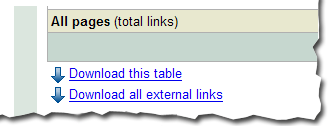
There are three different ways to download links data about your site. The first: download the current view of the table you see, which lets you navigate to any summary or details table, and download the data in the current view. Second, and probably the most useful data, is the list all external links to your site. This allows you to download a list of all the links that point to your site, along with the information about the page they point to and the last time we crawled that link. Thirdly, we provide a similar download for all internal links to your site.

We do limit the amount of data you can download for each type of link (for instance, you can currently download up to one million external links). Google knows about more links than the total we show, but the overall fraction of links we show is much, much larger than the link: command currently offers. Why not visit us at Webmaster Central and explore the links for your site?


93 comments:
I love this feature, thanks for adding it!
How often will the link data be updated?
Hi Julie, We update the data around once a month.
Thanks Aaron!
This is great..I guess I still can't understand why using this method, I see above 50 (related), and doing a search on my site with link:arthousereproductions.com, i see none.
i am frequent user of this tool and heavily really on this for my website analysis however, I sometime doubt if it presents true picture like link:www.360view4u.co.uk and :www.360view4u.co.uk returns different results for me.
what is : + domain name?
thanks
How long does it take Google to add a URL to the index? http://wwww.marylandsoftball.org
A great feature addition! This link discovery feature has helped me to close some open sections of my websites that should not be accessible to the world.
It has also helped me to tweak some SEO stuffs.
Good Google!
I really love this feature! Its about time that it was added.. But its kinda slow on the updates. Im using it on my site ( www.spillnett.no ) Since its new its really hard to trackiback all the new backlinks added.. Soo a tool to manual index all sites would also be great, as i update it 3-4 times a day and have a forum...
The data information provided for the links is good enough to understand the value of external and interanl linking.
Based on the inputs , a webmaster can work on the link structure process.
overall it does add value.
Neeraj
Ad Google Translate Gadget to your Blog:
http://googletranslategadget.blogspot.com
Nice feature, I would suggest adding some filters to it, like the ability to exclude from listing the links from a certain site
I have been using this feature but for some time now it has been saying that I have no external or internal links to my site. Why is that? There are many quality sites that have links pointing to my site, why does it show like I have no external links
Excellent Tool.
I have been using it for a while, but a good tool always can be improved in many ways to show us more useful information. This will help us also to improve our own job in many ways.
Thanks!
This is a great tool, but it seems to be missing a tremendous amount of backlinks. For example, Yahoo site explorer has many more backlinks listed for my domain as appear in this Google tool.
Oddly, my web site has been 'optimized' for google (sitemap uploaded, etc, but the results here are slightly lower than returned from Live Search or Yahoo.
Any ideas why? What can I do to compensate for this and thus help my ranking?
Hi, I'm new here and just using Google webmaster tools..it's a great program..:)
I use webmaster tools alot, i was just wondering how long it takes google to find websites which link to you, and update the links section in webmaster tools?
same here as a poster above
that's really cool, really was difficult to know how many links Google counts or not..but with this its easy ...thanks a lot!!!
I've been using the Google Webmaster utility but Google either doesn't know all of my internal links or doesn't display them. So at this point I don't know if Google has a problem crawling my site and or if this tool is just inadequate.
Will this tool show up redirected links that end up at your site?
Thanks,
HI guys, When I look at external links it shows links to my website i.e interna links?? Anyone know why this is???
Cheers
Scott
Why in the link section do I have 23 external links and looking vai google Link search i have none
Which is right ?
I have more sites link to us, but Google sees only less than 5. Why is that? I dont see the sites that link to us... Please explain it further and in detailed information. Thank you!
Ana, the key is "sample of links" -- not all links are shown.
Hello, has anyone been able to answer mimi's question?
I'm having the same exact problem. In fact, Google has already indexed many sites that backlink to my site (including the specific pages on those sites that contain the backlink), yet it says I have no external links.
Should I simply wait? Someone mentioned that backlinks update slowly.
I am having the same problem - it shows that I have external links, but when I check links:mywebsite.com the answer is a zero?
Denis
There's a bug on the listing page for specific URLs. On the page that lists external links it shows my index page has 178 links in. Clicking the 178 displays a page that lists those links. They don't all fit on one page (max view is 100) but the next button links back to the initial list of URLs, not the next page of the links to the index.
I'd like to echo Ken's comment above regarding the links bug. I've also posted a question regarding this problem in the Google Webmaster Tools Help Group, but did not receive an acknowledgement or reply from anyone on the Google team. I'm starting to wonder if the Google webmaster team is dedicated to solving (or at least acknowledging) bugs that surface with their webmaster product?
I am having the same problem as several of you: Google shows 0 "inbound"/"external" links to my site yet Yahoo shows many. I used this website to check that status: http://www.checkmypr.com/
Can anyone offer some advice as to why Google is ignoring those links, thus hurting my PageRank? Thanks in advance...
Justin, I have the exact same problem. It seems that Yahoo updates internal and external links much more frequently than google.
What is amazingly confusing is that Google has indexed and cached those external links pages (their pages' Google cache actually shows my site's link). So Google HAS seen those external links.
Same evidence and problem for internal pages and links.
But still ZERO external/internal links for me too.
great feature. I am using this and all other at www.google.com/sitemaps
Hi Guys,
I thought it was just me for a minute there, with this internal/external link thing...
I have been actively keeping check on my site, and continue to see "ZERO External/Internal Links" for me too. I have Many Internal links and External links to my Many posts/site and I Never see any E/T links data coming or going to my pages. What's up with that? Did anyone ever find out? If so please let me & everyone else in on how to resolve this issue, which is costing all of us who are experiencing this headache of a hold-back to our businesses! Thank You in advance and wishing the Best to all of you!
Are the webmaster tools no longer working? They show last cache on Sept 24, last sitemap checked Sept 29, but cache in SERPs shows Sept 28. Sounds like webmaster isn't being updated. Any thoughts?
Im the same i use the tool it shows i have hardly any links but i also no there are many sites pointing at mine but they dont show up in webmaster why is this,does anybody know.
Have had the same problem for more than two months! I find the silence from Google webcrew on this matter very unpolite. Is noone from Google reading this blog?
Hi folks--
Most of your questions have been answered in our Webmaster Help Group; in particular, please check out this thread on backlinks, where user Abracadabra provides insight into the differences in numbers and other factors.
@Ken, Jim: Thanks for the report; we've resolved this issue. Sometimes we bring feedback like this back to the team without posting a reply; we're definitely dedicated to improving our tools, and this sort of feedback doesn't go unnoticed. I'm sorry that you felt unacknowledged.
For those of you with site-specific questions (Why is X happening with my site/in my webmaster tools account?), please search our Webmaster Help Group and post your question there—along with your site's URL—if it hasn't already been answered.
thanks for adding it.
this is very good tool. thanks.
Muy util e interesante la nota
Same thing here:
link:www.mtcimport.com
Shows 0 external links. But there are many sites that are known to link to my site. Googgle has already indexed them. In fact I believe google discovered my site while crawling other sites.
This feature is broken. Google, being a respectible authoritative player in search business should take the responsibility to answer us and fix it.
Hi Brian--
The link: operator is designed to only show a sample of the links to your site; it's not a comprehensive list. If you'd like a more complete list of your site's backlinks, you can use the backlinks tool described in this post.
Nice feature, thanks for adding.
In webmaster tools, right now, we have 18 links. There are some sites that Google index (with PR 3), links to my site which is Çocuk Cep Telefonu . Even this links are old (2 months), we still do not see in the webmaster tools. What can be the reasons for this misbehavior?
Mesut Sahin Boydas
This is a great tool. Been using it for some time. Somewhere in the first few comments says it updates around once a month? Is this still true today? Does it update when a site is crawled?
Currently this data is updated several times per month.
The frequency of updates is not related to your site's crawl.
If the list of links in Webmaster Tools isn't going to be comprehensive, Google needs to add a clear disclaimer in Webmaster Tools itself. They need to put a warning in red letters next to links so that people won't go crazy checking and re-checking webmaster tools for their links to show up.
Why google can't to list my backlink
Please help!!
My Blog is http://jhalprob.blogspot.com
We originally had external and internal links showing, at lease 80 external links. then they all disappeared. Is this tool broken for my site. Did i do something wrong and need to re-submit the site?
This is a great SEO analysis tool. It is amazing how Google can collect this data for so many sites - it really helps us understand where our traffic is coming from. Thanks, PlanOpen
This feature seems to have disappeared since Webmaster Tools was updated. I was really disappointed with that since the list of backlinks was one of my favorite features in Webmaster Tools. Thumbs down Google...you used to be cool but now I'm not so sure.
Free Traffic Hits
- Tyler Ellison
Hi Tyler,
I'm not sure what you're referring to, since this feature hasn't been removed and appears fine in my account. If it isn't working correctly for you, please post the details (including your site's URL) in our Webmaster Help Group.
Some of the Google webmasters tools are NOT working my way ?
I had 2 Meta description issues but I fixed them and saying the same issues, The top 20 queries are the same now as in November and December ?
Not updateing. :(
how can i see my site's backlinks in google webmaster tools?
Just wondering how long it might take for a brand new site to have it's link:www.address.com function working. Any ideas?
Colin
Mountain Bikes Apart
I wonder if I am doing something wrong with (www.dorksguide.com) because my links on Google Webmaster Tool don't show yet. My pages are dynamic. Does that have anything to do with it?
This feature doesn't seem to work for either of my sites (http://www.livecostarica.net or http://www.2go2marketing.com)... Is this because both are fairly new in being crawled and submitted (Less than 2 months)? Does google plan to add more features and more novice focused tools in the future?
In response to Brandon: I have noticed that many sites can link to your homepage, but they won't count for anything at all because the link will contain a "no follow." Google does not give credit for "no follow" links as far as I understand. Here is an example: HREF="http://dorksguide.com" REL="nofollow">www.dorksguide.com/A>
The link above will link to my site dorksguide site but will not help my rankings. :(
When i use "link:www.pharmacychecker.com" in a google search it either shows only nine links, or it will read 2500 or so links but then only have 11 of them. We know from our Google Analytics reports that we have far more links than 9 or 11. Why is this feature ("link:www.pharmacychecker") yielding such a strange result?
If you're wondering where your links are and you're new, it may that Google just hasn't updated yet, which is only around 3-4 times a years. So be patient for the links to appear for your site.
http://www.greatdiamondsforless.com
I faced the problem with my service. A month ago the page from my website was thrown out of Google Search Engine. I can't find it. http://www.customwritings.com/custom-essay.html
I have a large website with thousands of backlinks from articles, blogs, news sites and press releases yet I noticed it says I have 0 external links.
On my other smaller websites this seems to be working just fine.
Josh... I think it is just buggy. Because one month I have no external links showing up and the next they were there. I think this analytics stuff just takes a few months to level out. Not sure why though.
Brandon
Hi folks:
If you'll read the previous comments, you'll note that most of your questions have been answered already. In particular, please check out this thread on backlinks.
Hi again, I tried again to find a page of my website in Google Search Engine, but I failed again. Please check it out again. Here's this page: Custom Essay.
Derric:
A site: query will show whether a page is included in Google's index. In your case, your page is in our index: site:www.customwritings.com/custom-essay.html
Google indexes theese links yes but why do you think one is indexed Dinleme cihazı every day and the other once a week eg Casus Telefon
Any thoughts on incorporating some of this into analytics?
My site www.gurumai.com is about 2 months old now. It is indexed by Google. There are plenty of backlinks pointing to my site from many good external pages. Yet, when I check "link:www.gurumai.com", Google shows no links. I am worried over this. Please help me understand the solution/answer.
Thanks.
Every account within my dashboard is showing 0 backlinks. Is there a system wide problem, or is this limited to me?
My links have not been updated in the webmaster tools since about Jan 1, 2008. In the fall the updates were more regular. Something may be in the works since the update is overdue. An old post that makes me hope there is a big update in the works.
my web site numroos the backlink
but pr fall cause
How does it deal with multiple links for the same site?
My site www.ps3bonanza.co.uk has many back links but still remains on page 2!!! :(
Excellent tool. I want to ask that I have written blog (my first blog) & I want to know that when it will get cached?
Can this subdomain be crawled by google outo or i should submit it for crawling ? CASUS TELEFON
I have a large website with thousands of backlinks from articles, blogs, news sites and press releases yet I noticed it says I have 0 external links.
http://www.dsl-vertrag.info
Cool features, Very helpfull !!
Tanks a lot for this good feature.
I found my blog have more backlinks from yahoo than Google... MSN... no link.
Hmmm... at last i understand this. thank you
A great google hack to find backlinks is: .sitename. -www.sitename.com
This will find the backlinks in google. Like for my site
.themmazone. -www.themmazone.net
Google has eliminated a lot of little hacks in the past but this one remains.
- Tony
Martial Arts Supplies
How long does it take Google to add a URL to the index? http://wwww.bookcheapest.com
Hi everyone,
Since over a year has passed since we published this post, we're closing the comments to help us focus on the work ahead. If you still have a question or comment you'd like to discuss, free to visit and/or post your topic in our Webmaster Help Group.
Thanks and take care,
The Webmaster Central Team
Post a Comment